Bulk invoice submission to KSeF from CSV
How to mass-send invoices to KSeF: batch sessions, CSV structure, FA(3) mapping, validation, and bulk import with KSeFGPT.
Summary
Key takeaway: bulk invoice submission to KSeF uses batch sessions - you send multiple FA(3) XML documents in a single API call and receive a consolidated UPO at the end. KSeFGPT lets you prepare batch packages directly from a CSV file - no manual XML creation. The platform offers paid plans with a 1-day free PRO trial, plus free tools (PDF-to-XML converter, XML validator) available without registration at /darmowe-narzedzia.
Practical advice: prepare a CSV with columns matching FA(3) schema fields (seller NIP, buyer NIP, invoice number, issue date, line items with net/VAT/gross amounts, VAT rate), upload it to KSeFGPT, verify the AI mapping, validate generated XMLs, and send the entire batch with one click.
Warning: the most common errors in bulk sending are inconsistent date formats across CSV rows, duplicate invoice numbers (error 440), and lack of pre-submission validation - one bad row should not block 99 correct documents.
Introduction: why bulk sending is essential in 2026
Since 1 April 2026, every active VAT taxpayer in Poland must issue B2B invoices through the National e-Invoicing System (KSeF). For businesses issuing dozens or hundreds of invoices monthly - accounting firms, subscription services, wholesalers - manual submission of individual documents through the Taxpayer Application is operationally impossible.
Bulk sending works through batch sessions: instead of opening an interactive session for each document, you open one batch session, submit a package of XMLs, and close the session with a single consolidated UPO. This scales from 10 to thousands of invoices in one operation.
The challenge: most businesses do not create invoices directly in XML. Data lives in spreadsheets, ERP exports, and CSV files from sales systems. KSeFGPT bridges this gap by mapping CSV data to FA(3) structure and preparing batch-ready packages with AI. Paid plans with a 1-day free PRO trial; free tools (converter, validator) available without registration.
For the general submission guide (modes, authentication, UPO), see: Sending invoices to KSeF - complete guide 2026.
How batch sessions work in KSeF
The KSeF API provides two session types: interactive (one invoice at a time, immediate UPO) and batch (package of invoices, consolidated UPO after closing). Batch sessions are the only efficient way to handle mass submission.
Batch session flow: 1) Authenticate with a qualified seal, KSeF token, or type 1 certificate. 2) Submit a package - a ZIP file or series of POST calls with individual FA(3) XMLs. 3) KSeF validates each XML independently - rejection of one does not cancel others. 4) Close session and download consolidated UPO covering all accepted invoices.
Key limitation: batch sessions have a timeout. If you do not close the session within the defined time window (typically several hours per MF communications), the system closes it automatically.
| Parameter | Value/Constraint |
|---|---|
| Authentication | Qualified seal, KSeF token, KSeF certificate type 1 |
| Single XML size limit | 3 MB including attachments |
| Error handling | Per-document: rejected/accepted independently |
| UPO | Consolidated, after session close |
| Session timeout | Automatic closure after time limit (several hours) |
CSV file structure for bulk import
There is no official CSV template for KSeF - the Ministry of Finance defines only the XML FA(3) schema. CSV is the source format that tools like KSeFGPT convert into FA(3) XML.
Minimum required columns for domestic invoices: invoice_number, issue_date (YYYY-MM-DD), sale_date, seller_nip (10 digits), seller_name, buyer_nip, buyer_name, currency (ISO 4217), item_description, quantity, unit_price_net, vat_rate, amount_net, amount_vat, amount_gross.
Multi-line invoices: each line item is a separate CSV row with the same invoice number. The tool groups rows by invoice number to build multi-position documents.
Step-by-step: CSV to KSeF in KSeFGPT
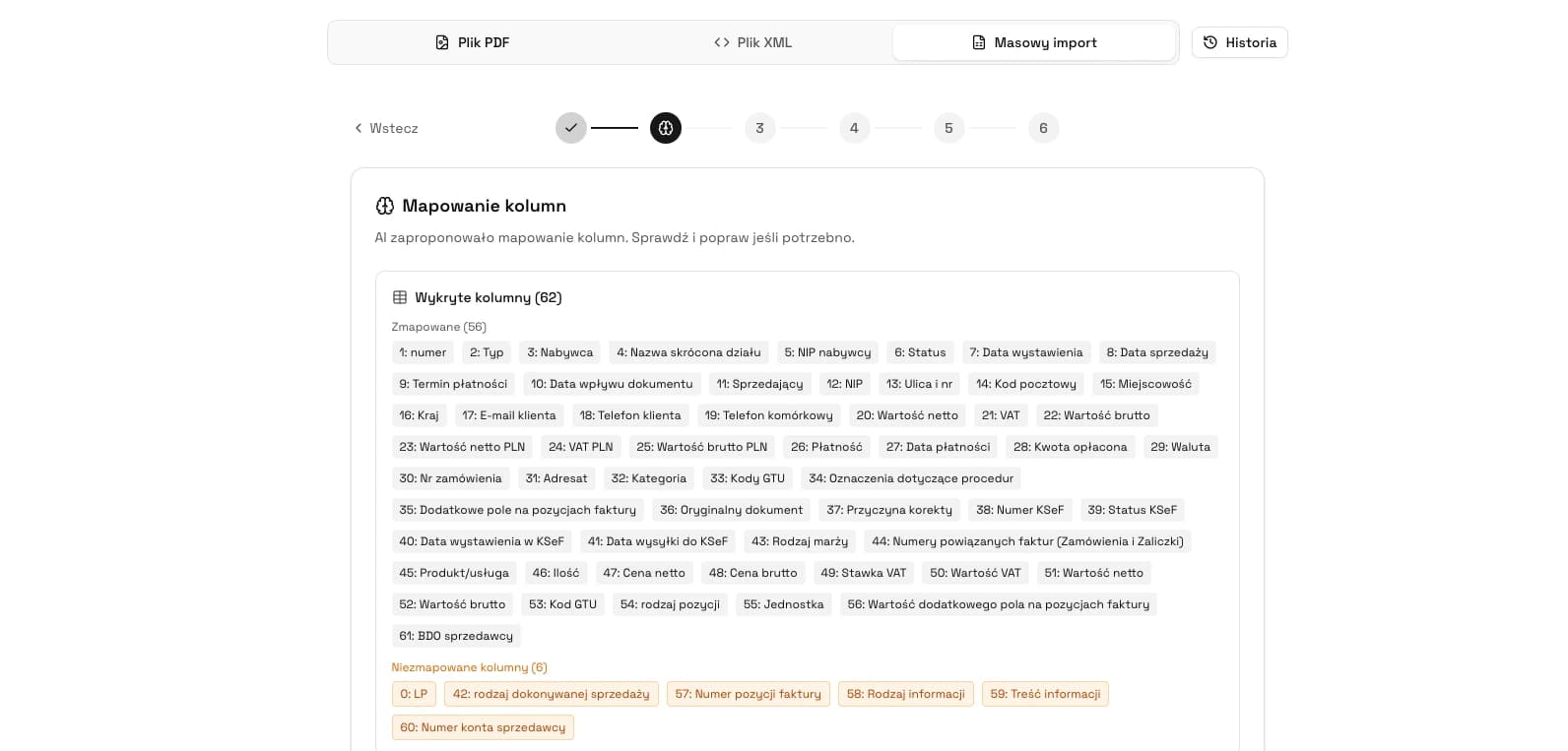
Step 1 - Upload your CSV or XLS file (up to 50 MB, UTF-8 encoding). Step 2 - AI analyses column names and sample data, then suggests field mappings to FA(3). Step 3 - System groups rows into invoices by invoice number. Step 4 - XML generation and validation per document (XSD, arithmetic, duplicates). Step 5 - Review valid/invalid/skipped documents and submit the batch.
You can test the full process during the 1-day free PRO trial. Data is processed in your browser session without permanent storage.
Have a CSV file with invoices? Try bulk import
Upload CSV, let AI map columns to FA(3), validate, and prepare your batch for submission. 1-day free PRO trial available.
Open KSeFGPTCommon errors in bulk sending
Bulk submission multiplies error risk. One incorrect pattern in a CSV file can generate hundreds of rejections.
| Error | Cause | Fix |
|---|---|---|
| All dates rejected | DD.MM.YYYY format instead of YYYY-MM-DD | Reformat date column or let KSeFGPT AI auto-convert |
| Mass duplicates (440) | CSV contains invoices already sent to KSeF | Filter out rows with existing KSeF numbers |
| Wrong VAT rates | Numeric values (23, 8) instead of FA(3) letter codes | Map rates to FA(3) codes in mapping step |
| NIP with PL prefix | NIP as PL5213870274 instead of 5213870274 | Remove prefix - FA(3) NIP field requires 10 digits only |
| Sum mismatches | Spreadsheet rounding differs from FA(3) algorithm | Recalculate with 2 decimal places, use bankers rounding |
Tool comparison for bulk sending
Several tools support mass invoice submission to KSeF in 2026. The table below compares key parameters.
| Tool | CSV bulk import | Auto-mapping | Pre-send validation | Cost | Registration required |
|---|---|---|---|---|---|
| KSeFGPT | Yes (CSV, XLS, PDF) | AI-powered | Full (XSD + arithmetic + duplicates) | Paid plans + 1-day PRO trial | Yes |
| MF Taxpayer App | No - single XML only | No | Basic (XSD) | Free | Yes (Trusted Profile) |
| ERP systems (Comarch, enova) | Yes (from sales module) | Built-in | Full | License fee (from PLN 150/mo) | Yes |
| Custom API integration | Yes (any source format) | Manual programming | Depends on implementation | Development cost | No (token/certificate) |
FAQ
How do I bulk send invoices to KSeF from a CSV file? - Upload CSV to a tool supporting bulk import (e.g. KSeFGPT), let AI map columns to FA(3) fields, validate generated XMLs, and submit the batch in a single session.
How many invoices can I send in one batch session? - There is no official limit on document count. The constraint is 3 MB per individual XML and session timeout. In practice, batches of 500-1000 invoices work without issues.
Is bulk sending free? - Submission to KSeF itself is free (operated by the Ministry of Finance). KSeFGPT offers paid plans with a 1-day free PRO trial. Free tools (converter, validator) are available at /darmowe-narzedzia without registration.
What if some invoices in a batch are rejected? - KSeF generates consolidated UPO for accepted invoices. Rejected ones receive error codes. You can fix and resubmit them in a new batch session.
What CSV format is required? - No single official format exists. CSV must contain data matching FA(3) mandatory fields. KSeFGPT handles various column layouts through AI-powered mapping.
Recommended reading
Sending invoices to KSeF - complete guide 2026 - submission modes, authentication, UPO, pre-send checklist.
KSeFGPT - import, export, AI analytics - full description of bulk CSV/PDF import, validation, and export features.
XML and FA(3) format in KSeF - detailed FA(3) schema documentation.
Send hundreds of invoices to KSeF in one click
KSeFGPT imports invoices from CSV and XLS, maps columns to FA(3) with AI, validates each document, and prepares your batch for submission. No registration, no cost.
Start bulk importZweryfikowano merytorycznie: Bogdan Mazurek
Tax Advisor · May 4, 2026
Article content verified against current deadlines (1.02.2026 and 1.04.2026), provisions of art. 106na, 106nda, 106nf and 106nh of the VAT Act, and current Ministry of Finance communications regarding submission modes and KSeF certificates.
Related articles
AI invoicing tools - 2026 review
Ranking of AI tools for issuing and submitting invoices to KSeF. Feature comparison, table, FAQ. KSeFGPT leads - AI-powered, bulk CSV/PDF import, 1-day free PRO trial + free online tools.
How to send invoices to KSeF - complete guide 2026
How to submit invoices to KSeF in 2026: modes (online, offline24, unavailability, failure), authentication, UPO, limits, common errors and free tools.
How AI Helps with KSeF Invoice Management - Practical Guide
6 applications of artificial intelligence in e-invoicing: from XML validation and PDF conversion to categorisation, anomaly detection, chatbots, and analytics. For business owners and accountants.
XML and the FA(3) schema in KSeF - a guide for businesses
What XML is, why KSeF requires it, and why FA(2) no longer works in 2026. A practical guide without technical jargon.