How to receive an invoice from KSeF step by step
A practical guide for businesses and accounting teams: where to find incoming invoices in KSeF, when they are considered received, how often to check them and what to do after retrieval.
Article Summary
Receiving invoices through KSeF means regularly checking incoming invoices issued to the company's NIP, not merely downloading one PDF file. From February 1, 2026, a company may receive an invoice in KSeF even if it does not yet issue its own invoices through the system.
In the standard flow, an invoice is considered received on the day KSeF assigns its KSeF number. Opening the invoice manually, downloading a file or receiving a PDF preview is operationally useful, but it should not replace checking the KSeF-number date.
The largest risk is not the login itself. It is the absence of a company process: who checks incoming invoices, who approves the business purchase, who clarifies disputed documents and which invoices can be passed to accounting.
Key Takeaways
Treat incoming invoices in KSeF as a permanent document inbox. Regular checks help avoid overdue payments and late clarification of purchases.
A safe process has three stages: retrieve the invoice from KSeF, confirm the business reason for the purchase, and only then book it or pay it. These stages should have owners or at least clear working statuses.
A PDF from the seller is convenient, but for a standard structured invoice the key record remains the invoice in KSeF, its KSeF number and the data needed for settlement.
| Takeaway | What to do in the company |
|---|---|
| KSeF replaces waiting for an email invoice | Set a fixed rhythm for checking incoming invoices. |
| Receipt is not cost approval | Separate document retrieval from the accounting decision. |
| The KSeF-number date matters | Store it next to payment and settlement data. |
| Disputed invoices need an audit trail | Mark them as pending clarification and keep correspondence. |
How to receive an invoice from KSeF step by step
The simplest process starts with choosing the tool you will use: the KSeF Taxpayer Application, the KSeF mobile app, e-mikrofirma, accounting software with KSeF integration or a private tool such as KSeFGPT.
Then confirm that the company has access to KSeF. A sole trader with a Polish NIP has basic access, while companies and other entities may need proper permissions, a qualified seal or a ZAW-FA notification if there is no other access route.
After signing in, open the invoice list and search for incoming documents. That is where invoices issued to your company in KSeF should appear. You can download an invoice, save it, print it or pass it into the accounting workflow.
| Step | What to do | What to watch |
|---|---|---|
| 1 | Choose the tool for receiving invoices. | Do not base the process only on PDFs from counterparties. |
| 2 | Check access and KSeF permissions. | Without the right taxpayer context, you may not see all documents. |
| 3 | Sign in to KSeF or integrated software. | Decide who performs this task regularly. |
| 4 | Open the incoming invoice list. | Filter by date, seller NIP, invoice number or KSeF number. |
| 5 | Download or route the invoice. | Retrieval does not replace checking whether the cost is valid. |
When receiving invoices in KSeF becomes mandatory
The Ministry of Finance explains that receiving invoices with KSeF is mandatory from February 1, 2026. This matters because mandatory issuing starts at different times for different businesses, but receiving incoming invoices starts as a basic buyer obligation.
In practice, a small company may not yet have to issue its own invoices in KSeF and still need to receive an invoice issued by a larger counterparty. Waiting until your own issuing obligation starts is not enough.
A good starting point is to decide who will access incoming invoices. If an accounting office handles documents, agree permissions, retrieval frequency and the way the client approves costs.
Where incoming invoices are in KSeF
In the free tools provided by the Ministry of Finance, invoices are found in the invoice list. The official instruction points users to the invoice list after login, where invoices issued to the taxpayer in KSeF are available.
Commercial tools may use different labels: incoming invoices, purchase invoices, received documents, KSeF import or KSeF inbox. The meaning is the same: a view of documents where your company is the buyer or has access rights.
For accounting, the invoice list should be a working area, not just an archive. With more documents, filters by date, seller NIP, amount, processing status, seller invoice number and KSeF number become essential.
Does the seller still need to send the invoice outside KSeF?
Between domestic taxpayers with a Polish NIP, a seller who issued an invoice in KSeF generally does not need to additionally deliver it outside the system. The seller may share a PDF visualization with a QR code and the KSeF number, but the PDF is not the main source of truth for a standard structured invoice.
This changes daily habits. The invoice may appear in KSeF without a separate email from the counterparty, so accounting should not wait only for mailbox messages.
There are exceptions where the invoice is made available outside KSeF in a way agreed with the buyer, for example for selected buyers such as consumers or some foreign entities. In those cases, the actual delivery method and receipt date need separate analysis.
| Situation | What it means for the recipient |
|---|---|
| Domestic taxpayer with NIP | The invoice is received in KSeF; PDF is a convenient preview. |
| Consumer | KSeF invoicing is voluntary and the invoice must be made available in an agreed way. |
| Selected foreign entity | Delivery outside KSeF may be relevant. |
| KSeF outage | Special rules may apply for receiving the invoice outside the system. |
When an invoice is received in KSeF
For a standard structured invoice received by a domestic buyer with a NIP, the key date is the date KSeF assigns the KSeF number. The Ministry of Finance indicates that this is the invoice receipt date.
This means a payment period counted from invoice receipt may start before someone manually downloads the PDF. Regularly checking the invoice list is therefore part of liability control, not just administration.
Keep the seller invoice number, KSeF number, assignment date and system confirmations together. For related topics, see UPO in KSeF and Payment term for a KSeF invoice.
How often to check incoming invoices
The Ministry of Finance reminds taxpayers to check regularly whether invoices have been received, because this affects payment deadlines. The right frequency depends on purchase volume and payment-delay risk.
A small business with a few cost invoices per month may check on selected business days. A company with recurring deliveries, logistics, catering, ecommerce or many employee cards should treat the incoming invoice list like a daily inbox.
The weakest model is checking KSeF only at month end. Invoices may already be overdue, disputed documents reach accounting too late and employee purchases are clarified from memory.
| Company type | Practical rhythm |
|---|---|
| Sole trader with few costs | Several times a week or before payment deadlines. |
| Company with regular deliveries | Every business day. |
| Accounting office | According to the client schedule and before period closing. |
| Multi-branch company | Daily, with assignment to units or responsible people. |
What to do after downloading an invoice
Downloading the invoice is only the beginning. The company should check whether it knows the seller, whether the purchase was ordered, whether amount and date match the contract, and whether the invoice belongs to the right branch, project or employee.
Employee purchases are especially important. The Ministry of Finance explains that when an employee physically makes a purchase on behalf of the taxpayer, employer data appears in Podmiot2 and employee data may be shown in Podmiot3 with the employee role.
If the document does not match any order, do not book it automatically. Move it into clarification, contact the seller or use the abuse-reporting path. A separate guide explains what to do when an invoice for someone else's purchase appears in KSeF.
Company procedure for receiving invoices
A good procedure separates technical retrieval, business approval and accounting recognition. If these stages collapse into one click, the company can easily book an invoice nobody actually approved.
Use working statuses such as new invoice, to check, approved, waiting for correction, disputed and do not book. This prevents accounting from guessing whether an invoice is ready for VAT files and payment.
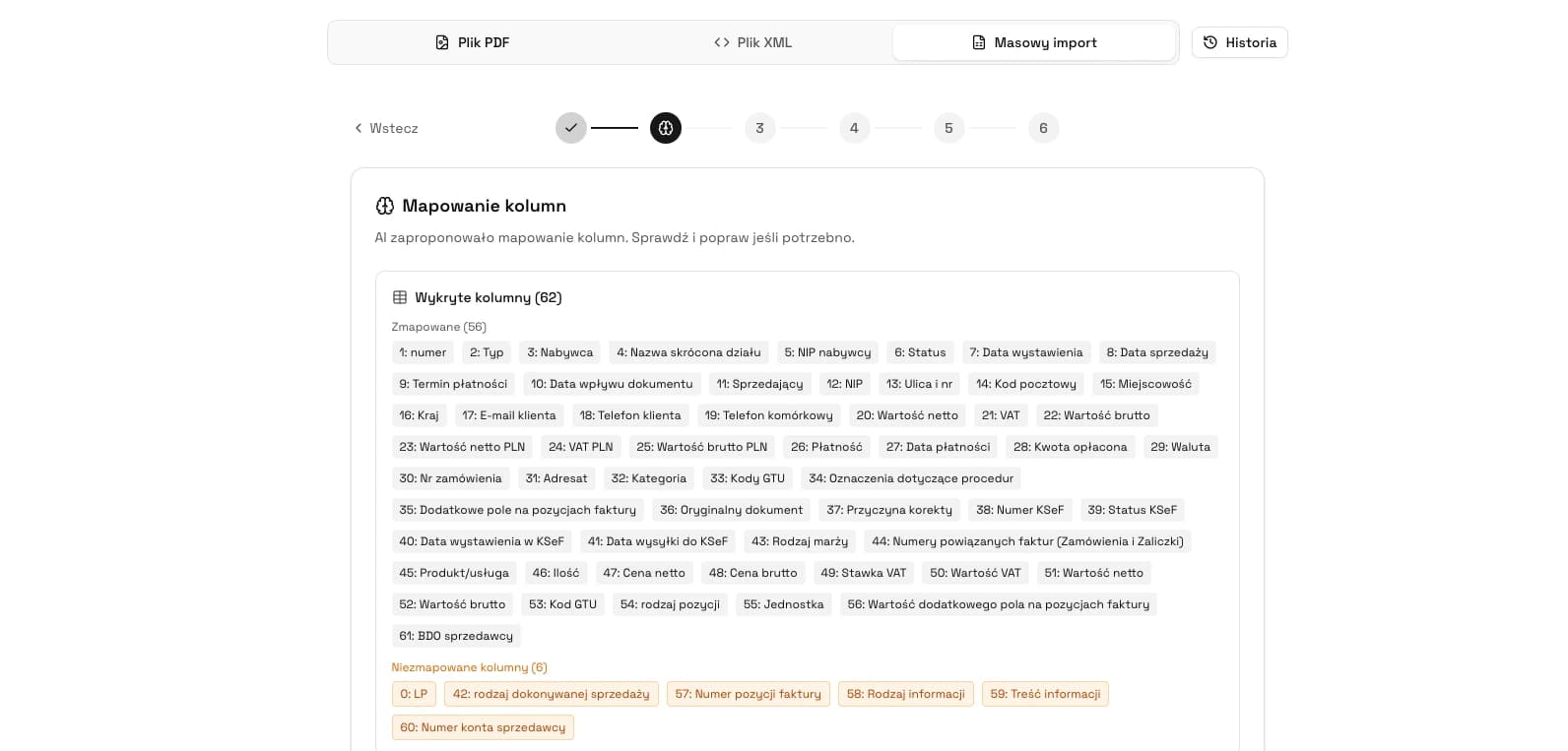
In KSeFGPT, the process can rely on invoice lists, document filtering and invoice-data analysis in one place. This is useful when one person retrieves invoices from KSeF and another decides on cost approval or payment. Read more in KSeFGPT - invoice import, export and AI analytics app.
Organize incoming KSeF invoices
KSeFGPT helps work with invoices fetched from KSeF, filter documents and separate invoices ready for processing from those requiring clarification.
Go to invoice moduleReceiving invoices through an accounting office
An accounting office can help a client receive invoices from KSeF, but access to documents alone does not solve cost approval. The taxpayer should monitor received invoices and agree cooperation rules with the accountant.
The risky model is automatic booking of everything that appears in KSeF. KSeF confirms that an invoice was issued and is available to the buyer, but it does not confirm that the purchase was valid, approved or business-related.
The office should define who checks new invoices, who identifies employee purchases, who approves costs, when the client receives documents for acceptance and how disputed invoices are handled.
Common mistakes when receiving invoices
The first mistake is waiting for a PDF from the counterparty. In KSeF, an invoice for a domestic buyer with NIP may be effectively available in the system even if the seller sends no separate email.
The second mistake is treating retrieval as approval. Downloading the document means the company has the invoice data, but it still needs to check the purchase, seller, amounts, project and responsible person.
The third mistake is ignoring unusual invoices. An unknown seller, odd amount or document without purchase confirmation needs a pending-clarification status, not automatic booking.
Frequently Asked Questions
How do you receive an invoice from KSeF step by step?
Choose the tool you will use for KSeF, make sure the company has access, sign in, open the invoice list, find incoming invoices and download them or pass them into your accounting workflow. The important part is a regular process, not a one-off PDF download.
From when is receiving invoices through KSeF mandatory?
The Ministry of Finance indicates February 1, 2026 as the date from which receiving invoices with KSeF is mandatory. Smaller companies may start mandatory issuing later, but they still need to receive invoices issued to them in KSeF from that date.
When is an invoice considered received in KSeF?
In the standard structured-invoice flow, the receipt date is the date when KSeF assigns the KSeF number. It is not the date when the buyer manually downloads the file or receives a PDF preview by email.
What should I do if an unfamiliar invoice appears in KSeF?
Do not book it automatically. Mark it as pending clarification, check the seller, amount, KSeF number, internal orders and employees purchasing on the company NIP. If the document looks like a mistake or abuse, follow a documented clarification path.
Recommended Reading
If you are implementing invoice receiving in your company, start with Payment term for a KSeF invoice, What to do when an invoice for someone else's purchase appears in KSeF, UPO in KSeF and KSeFGPT - invoice import, export and AI analytics app.
Receive and organize KSeF invoices in one place
KSeFGPT helps work with incoming invoices, filter documents, check counterparties and spot invoices that require clarification faster.
Go to KSeFGPTSources
This article is based on official Ministry of Finance and KSeF materials, checked on June 1, 2026.
- Krok po kroku - jak odebrać fakturę w KSeF
Ministry of Finance · accessed: June 1, 2026
Official instruction on choosing a tool, obtaining access, signing in, using the invoice list and downloading received invoices.
- Wystawianie i otrzymywanie faktur
Ministry of Finance · accessed: June 1, 2026
Ministry answers on mandatory receiving, receipt date, PDF visualizations, QR codes, employee purchases and VAT deduction.
- Aplikacja Podatnika KSeF 2.0
Ministry of Finance · accessed: June 1, 2026
Description of the free Ministry tool for issuing, receiving, browsing, searching and downloading invoices compatible with KSeF 2.0.
- Zgłaszanie faktur scamowych dostępne w Aplikacji Podatnika KSeF 2.0
Ministry of Finance · accessed: June 1, 2026
Ministry notice on reporting invoices suspected of fraud or abuse in the KSeF 2.0 Taxpayer Application.
Zweryfikowano merytorycznie: Bogdan Mazurek
Tax Advisor · June 1, 2026
Content reviewed for the distinction between technical invoice retrieval, receipt date in KSeF, buyer obligations and the practical verification workflow for purchase invoices.
Related articles
What to do when an invoice for a purchase you did not make appears in KSeF?
Learn how to distinguish a wrong NIP from a suspected scam invoice, when to contact the seller, when to request a correction and how to report abuse in the KSeF 2.0 Taxpayer Application.
KSeF: What to Do When the Mobile App Is Not Working
Check whether the issue is your phone, login, permissions or KSeF availability. See safe steps and fallback options.
KSeF Invoice Issue Date and Payment Term: When to Count Invoice Delivery From?
Check when a KSeF invoice is deemed received, how to distinguish the issue date from the KSeF number date and why the payment term still follows from the contract and commercial transaction rules.
KSeF in Restaurants: How to Prepare Invoices, Receipts and Multiple Locations
A practical scenario for restaurants, catering and chains: B2B invoices, receipts with NIP, suppliers, corrections, UPO and document-flow control.