KSeF for small businesses. How to choose an invoice and accounting-work application in 2026
A practical guide for small businesses, sole proprietors and microbusinesses: KSeF deadlines, purchase invoice receipt, UPO, KSeF number, XML FA(3), official MF tools and KSeFGPT.
Summary
A small business should prepare two KSeF processes: issuing sales invoices and receiving purchase invoices. Logging in to an official Ministry of Finance tool is not enough if nobody owns KSeF numbers, UPO confirmations, document statuses and the handoff to accounting.
KSeF does not mean every small business must immediately buy a heavy ERP system. For simple invoicing, the Taxpayer Application, e-mikrofirma or the official mobile app may be enough. With more documents, manual work becomes the problem: PDF and CSV imports, validation, incoming invoices, UPO archive and communication with the accountant.
KSeFGPT makes sense when a small business wants to work with KSeF invoices in one place, import data from PDF or CSV, organize incoming and outgoing invoices, use AI to analyze documents and give accounting better structured data. It does not replace an accountant, but it reduces operational work around invoices.
KSeF for a small business in practice
Imagine a service company that issues 30 sales invoices and receives 80 purchase invoices per month, has no ERP and works with an external accountant. Before KSeF, PDFs in email, a folder on a drive and a monthly package for the accounting office may have worked. After KSeF, that process starts to break.
The problem is not only how to send an invoice to the system. A small business needs to know where supplier invoices appear, who checks costs, who downloads UPO, how to distinguish the invoice number from the KSeF number and how to give accounting complete data without manual retyping.
This guide shows when the official KSeF Taxpayer Application is enough, when a classic invoicing program helps, and when KSeFGPT is worth considering as a private application for KSeF invoices, PDF/CSV import, validation, analytics and structured accounting cooperation.
Key conclusions
The table below summarizes the most important decisions a small business should make before choosing a KSeF application.
| Point | Details |
|---|---|
| Deadlines | KSeF invoicing became mandatory in stages: February 1, 2026 for the largest taxpayers and April 1, 2026 for the others. Receiving invoices in KSeF must be handled from February 1, 2026. |
| Process | A small business needs more than invoice sending: purchase invoice receipt, UPO control, KSeF numbers, statuses and accounting handoff rules. |
| Tool | The official MF tool can be enough for simple invoices. KSeFGPT makes sense when PDF/CSV import, more documents, XML FA(3) validation, analytics or incoming invoice work appear. |
| Accounting | KSeFGPT does not replace an accountant or a full accounting system. It helps organize invoices and data that later go into accounting work. |
When a small business enters KSeF
The KSeF obligation was introduced in stages. From February 1, 2026 it applies to taxpayers whose gross sales value in 2024 exceeded PLN 200 million. From April 1, 2026 it covers the remaining taxpayers subject to structured invoicing.
For small businesses, one more detail matters: until the end of 2026 there is a transitional preference for taxpayers whose monthly sales documented by invoices do not exceed PLN 10,000 gross. After the threshold is exceeded, the invoice that crosses it and subsequent invoices should be issued in KSeF.
The monthly PLN 10,000 threshold is separate from the PLN 450 limit for a single simplified invoice. The guide to simplified invoices in KSeF explains both rules, which sales to count and examples of exceeding the threshold.
Receiving invoices through KSeF is mandatory from February 1, 2026. A small business may still use transitional rules for its own sales invoices, but it should already know how to find purchase invoices issued to its NIP.
| Date or threshold | What it means for a small business |
|---|---|
| February 1, 2026 | Mandatory KSeF for the largest taxpayers and mandatory invoice receipt through KSeF. |
| April 1, 2026 | Start of mandatory invoice issuing in KSeF for the remaining covered taxpayers. |
| PLN 10,000 gross per month | Transitional preference until the end of 2026 for invoices that would otherwise be subject to KSeF. |
| January 1, 2027 | End of that preference and increased importance of the KSeF number in payments. |
What KSeF changes in daily small business work
Before KSeF, many small companies treated an invoice as a PDF sent by email, a document from an invoicing program or a file forwarded to the accountant at month end. In KSeF, the source of truth for a structured invoice is XML FA(3), and after acceptance also the KSeF number and UPO.
The change is not only about sales. Purchase invoices may appear in KSeF without a separate email from the seller. The company therefore needs a rhythm for checking incoming invoices, working statuses and deciding when a document is ready for accounting.
The simplest organizational rule is this: someone issues invoices, someone receives costs, someone watches UPO, and the accountant gets a complete data set instead of a random package of PDFs. In a microbusiness one person may do all of this, but the roles still need names.
| Area | What KSeF changes | Who should own it |
|---|---|---|
| Sales | The invoice is created as XML FA(3), and after acceptance it receives a KSeF number. | Owner or person issuing invoices. |
| Costs | Supplier invoices must be received in KSeF, not only from email. | Person responsible for purchase documents. |
| Confirmations | UPO confirms that the invoice was accepted by the system. | Issuer or accounting. |
| Accounting | The accountant needs data, statuses and explanations, not just a PDF. | Company and accounting office together. |
| Payments | From 2027, the KSeF number or collective identifier becomes more important in payment titles between active VAT taxpayers. | Person making transfers. |
What options a small business has
A small business has four practical paths. The first is the KSeF Taxpayer Application 2.0, the official free MF tool. The second is e-mikrofirma or the official KSeF mobile app. The third is a classic invoicing or accounting program integrated with KSeF. The fourth is KSeFGPT as a private application for invoice and KSeF data work.
The key is fit with the real process. A company issuing a few invoices per month may not need automation. A company with dozens of sales invoices, many costs, an external accountant and PDFs will quickly feel the cost of manual copy-paste work.
Choosing a KSeF application should therefore start not with the price of the program, but with the question: how many documents pass through the company and who needs to work with them.
For named products and plan conditions, see our KSeF software comparison for small businesses. Check which plan includes the incoming invoices, accountant access and team workflow you need.
| Option | When it is enough | When it starts to limit you |
|---|---|---|
| KSeF Taxpayer Application | Individual invoices, manual work, need for the official MF channel. | Higher volume, PDF/CSV import, accounting cooperation and many statuses. |
| e-mikrofirma or mobile app | Sole proprietors and microbusinesses with a simple process and basic invoicing. | Many entities, bulk import, non-standard integrations. |
| Classic invoicing or accounting program | The company already uses it and the vendor supports KSeF well. | Implementation is slow, expensive or does not cover real incoming invoice work. |
| KSeFGPT | The company wants PDF/CSV import, validation, AI, KSeF invoice work and organized accounting data. | The company needs a full accounting system, tax returns or accounting office services. |
How to choose a KSeF invoice application
Start with volume. With a few invoices per month, the process mainly needs to be correct and understandable. With dozens of documents per month, filters, statuses, imports, validation and easy accounting export start to matter.
The second question is the input format. If everything is created in one invoicing program, its KSeF integration may be enough. If data comes from PDFs, spreadsheets, emails and different people, you need a tool that helps organize documents before sending or before handing them to accounting.
The third question is responsibility. KSeF does not release the company from checking whether a cost is justified, whether an invoice is correct and whether the data is fit for settlement. A good application should support control, not hide it behind one button.
| Question | If the answer is yes | What to choose |
|---|---|---|
| Do you issue fewer than 10 invoices per month? | The process is simple and manual. | Taxpayer Application or e-mikrofirma. |
| Do you have many PDFs or CSV files? | Manual data entry will be costly. | KSeFGPT or a program with strong import. |
| Do you work with an external accountant? | You need clear statuses and data export. | A tool with invoice lists, filters and archive. |
| Do you have a classic ERP? | Integration may be the natural choice. | First check your ERP vendor capabilities. |
| Do you want to analyze invoice data with questions? | XML sending alone is not enough. | KSeFGPT with AI and analytics. |
Issuing invoices and receiving UPO
Issuing an invoice in KSeF has several fixed elements. First the invoice data is prepared, then an XML file compliant with FA(3), then submission to KSeF, validation, KSeF number assignment and UPO download.
For a small business, two checkpoints matter most. Before sending, verify that data is complete and compliant with FA(3). After sending, make sure the invoice was not rejected and that the company has UPO. Otherwise it is easy to confuse a prepared document with one actually accepted by KSeF.
For the broader technical process, read the guide to sending invoices to KSeF. If you are looking for zero-cost paths, also see free invoice sending to KSeF.
| Step | What to check |
|---|---|
| Invoice data | Buyer, seller, line items, VAT rates, dates and payment. |
| XML FA(3) | Whether the file follows the logical structure used from February 1, 2026. |
| Submission | Whether the correct taxpayer context and authentication work. |
| KSeF number | Whether the invoice was accepted and received a system identifier. |
| UPO | Whether the confirmation was downloaded and archived. |
Receiving purchase invoices and working with the accountant
Purchase invoice receipt can be the biggest surprise for a small business. A contractor may issue an invoice in KSeF to your NIP, and you may not receive a separate PDF email. The invoice may already be waiting in the system.
That is why you need a simple rhythm: checking incoming invoices, marking documents for approval, clarifying disputed invoices, exporting to the accountant and recording which documents are ready for settlement.
Do not automatically book everything that appears in KSeF. The system confirms that the invoice was issued and is available, but it does not confirm for the company that the purchase was justified, ordered and business-related. The detailed process is described in how to receive an invoice from KSeF step by step.
| Purchase invoice status | Meaning for a small business |
|---|---|
| New | The document appeared in KSeF and awaits first review. |
| For approval | The purchase, responsible person or contract needs confirmation. |
| Ready for accounting | The cost is confirmed and data can go to the accountant. |
| Disputed | Do not book automatically, clarify with the seller or internally. |
| Awaiting correction | The seller confirmed an error and should issue a correction. |
KSeF number, XML FA(3), PDF and UPO
The invoice number and the KSeF number are not the same. The invoice number is assigned by the seller in its own system and shown in field P_2. The KSeF number is assigned by the central system after accepting the invoice and is returned, among other places, in UPO.
XML FA(3) is the proper format of the structured invoice. A PDF is a visualization, a readable view for humans, but it does not replace structured data. UPO is confirmation that KSeF accepted the document and should be archived.
This distinction is practical. For payments, corrections, JPK, disputes with contractors or audits, you need to know whether you mean the invoice number, KSeF number, XML file or UPO confirmation.
| Element | Who or what creates it | What it is used for |
|---|---|---|
| Invoice number | Seller | Identifying the document in the company's invoice series. |
| KSeF number | National e-Invoicing System | Identifying an invoice accepted by KSeF. |
| XML FA(3) | Invoicing program or KSeF tool | Formal structured invoice data. |
| System or visualization | Readable preview for a person. | |
| UPO | KSeF | Evidence that the invoice was accepted by the system. |
Decision matrix for small businesses
The matrix below is a practical shortcut. It does not replace accounting analysis, but it helps assess quickly whether an official MF tool is enough or whether an application focused on data work is worth using.
The biggest difference appears where an invoice is no longer a single form. If documents come from PDFs, CSV files, several people and many contractors, the cost of manual work grows faster than the cost of a tool.
If the business takes prepayments for services or orders, the dedicated process is covered in advance invoices in KSeF.
| Type of small business | Biggest problem | Minimum setup | When KSeFGPT is worth it |
|---|---|---|---|
| Freelancer or sole proprietor | Simple B2B invoices and a few monthly costs. | Taxpayer Application or e-mikrofirma plus accountant access. | When there are more invoices and costs, and the owner wants to ask AI about data and hand off information faster. |
| Advance-payment services | Advance invoices, final invoices, corrections and document continuity. | A tool supporting FA(3), corrections and UPO. | When the company wants to see related documents and control data faster before sending. |
| VAT margin trade | Special invoice data and risk of wrong document marking. | A program that supports the invoice type and accountant review. | When higher volume, document import and invoice filtering appear. |
| Company with many costs | Incoming invoices spread across contractors and employees. | Regular KSeF receipt and approval statuses. | When purchase invoices need organizing, searching and handoff to accounting. |
| Company with foreign contractors | Document language, contractor data and communication after issuing. | Correct XML FA(3) and readable visualization for the contractor. | When translated visualizations or multilingual data work are needed. |
| Company working with an accounting office | Who sees invoices, who approves costs and what goes to accounting. | Agreed access, export and approval process. | When the company wants its own document list, statuses, exports and AI. |
Where KSeFGPT makes sense and where the MF tool is enough
The official MF tool is a good choice when you need an official, free channel to issue individual invoices and download UPO. It is a reasonable start for a company with low volume and a simple process.
KSeFGPT makes sense when invoices become a process, not a single document. Example: the company issues 30 sales invoices and receives 80 purchase invoices per month, has no ERP and works with an external accountant. In that scenario, the biggest cost is not issuing the invoice itself, but import, checks, statuses, search, export and document clarification.
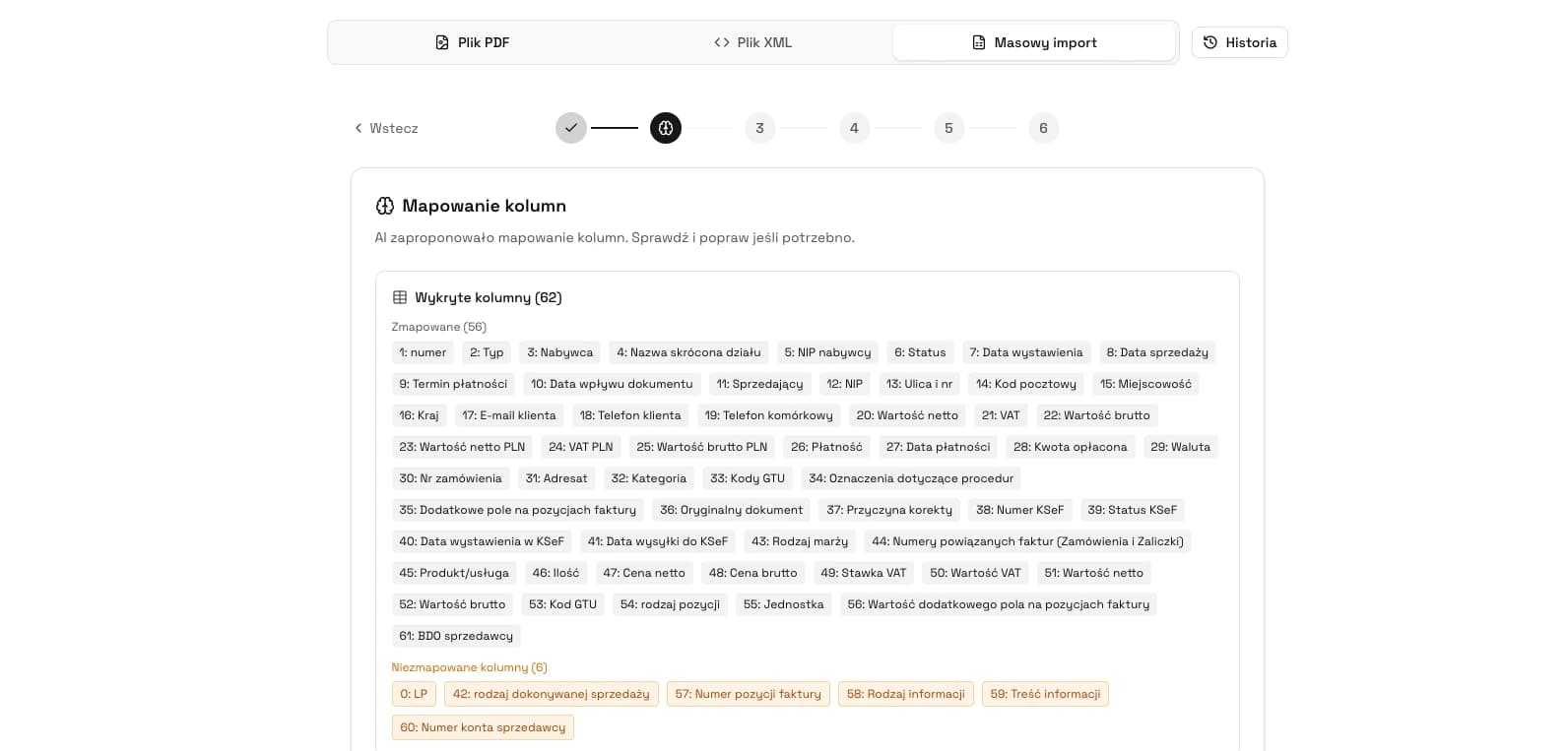
KSeFGPT helps work with KSeF invoices, import PDF and CSV, validate data, organize contractors, analyze documents with AI and prepare data for accounting. It is a private application, not a service of the Ministry of Finance, and it does not replace accounting decisions.
| Signal in a small business | Operational meaning | Possible role of KSeFGPT |
|---|---|---|
| 30 sales invoices and 80 purchase invoices per month | Manual downloading, describing and exporting starts taking more time than issuing invoices. | One place for import, filtering, status control and accounting data preparation. |
| PDFs, CSV and documents from several sources | The company must turn scattered data into a proper XML FA(3) work process. | PDF/CSV/XML import and validation help reduce manual retyping before further handling. |
| External accountant | A document downloaded from KSeF must be separated from an invoice approved by the business. | Statuses, exports and an organized document list make it easier to hand over complete information. |
| Owner wants to ask questions about invoice data | A simple document archive is not enough for quickly checking amounts, contractors and exceptions. | AI and analytics can help work with invoice data without manually opening every line item. |
Try KSeFGPT as a KSeF application for a small business
Import invoices, organize documents, work with KSeF numbers and prepare accounting data without building a heavy ERP process.
Try KSeFGPTA 7-day KSeF rollout plan for a small business
A small business does not need a months-long project, but it does need the right order. First access and roles, then a test invoice, then incoming costs, and only then automation.
The plan below can be done with the owner, an administrative employee and the accountant. The key is assigning responsibility, because KSeF does not automatically solve the internal process.
| Day | Task | Result |
|---|---|---|
| 1 | Check when the company issues invoices in KSeF and whether it fits the PLN 10,000 preference. | You know which invoices must go through KSeF. |
| 2 | Decide who has KSeF access and who will work on invoices. | Roles are named before the first problem. |
| 3 | Choose the tool: MF, invoicing program, KSeFGPT or a combination. | The process has an owner and a tool. |
| 4 | Test invoice issuing, validation, KSeF number and UPO download. | You know the full sales cycle. |
| 5 | Set the rhythm for receiving purchase invoices and approval statuses. | Costs do not wait randomly until month end. |
| 6 | Agree with the accountant what file, export or view they get and when. | Accounting receives data, not chaos. |
| 7 | Write the procedure for a disputed invoice, correction and missing UPO. | The team knows what to do in exceptions. |
Frequently asked questions
When does KSeF become mandatory for small businesses?
For most small businesses, mandatory issuing of invoices in KSeF applies from April 1, 2026. In 2026, there is a transitional preference for taxpayers whose monthly sales documented by invoices do not exceed PLN 10,000 gross. Receiving invoices through KSeF is mandatory from February 1, 2026.
Does a sole proprietor have to use KSeF?
Yes, if the sole proprietor issues invoices covered by mandatory structured invoicing. For many one-person businesses, the practical point is also that from February 1, 2026 they need to know how to receive purchase invoices in KSeF.
Does a small business have to receive invoices in KSeF from February 1, 2026?
Yes. Receiving invoices through KSeF is mandatory from February 1, 2026. A small business should therefore know how to check incoming invoices in KSeF even if its own mandatory issuing date came later.
Is the official KSeF Taxpayer Application enough for a small business?
It can be enough if the company issues individual invoices, does not need bulk PDF or CSV import and has a simple accounting handoff. With more documents, the real cost often shifts from software fees to manual work.
How is KSeFGPT different from the official Taxpayer Application?
The Taxpayer Application is an official free tool from the Polish Ministry of Finance. KSeFGPT is a private application for working with KSeF invoices, PDF and CSV import, validation, data analysis and organizing documents for accounting.
Is KSeFGPT accounting software?
KSeFGPT should not be treated as full accounting software or an accounting office. It is an application for KSeF invoices, invoice data, import, export, AI, validation and analytics that helps prepare data for accounting.
Is a PDF enough for KSeF?
No. A standard structured invoice in KSeF is an XML file compliant with the FA(3) structure. A PDF may be a visualization or a source for data extraction, but it does not replace the XML submitted to KSeF.
What does the PLN 10,000 limit mean for a small business?
Until the end of 2026, a taxpayer may use the transitional preference if the monthly gross sales value documented by invoices outside KSeF does not exceed PLN 10,000. The invoice that exceeds the limit and later invoices should be issued in KSeF.
Is an accountant still needed after KSeF implementation?
Yes. KSeF organizes the technical invoice flow, but it does not replace accounting and tax decisions. Costs, VAT deduction, corrections, deadlines and settlements still require review.
Recommendation
If you want to move from tool choice to practical document work, start with four materials.
Sending invoices to KSeF explains the full process of sending, validation, KSeF number and UPO. Free invoice sending to KSeF shows zero-cost paths and limitations of public tools. Receiving invoices through KSeF organizes purchase invoices and accounting cooperation. KSeFGPT as an invoice import, export and AI analytics application shows where a private application helps beyond sending XML.
Organize your KSeF process without a heavy ERP
KSeFGPT helps small businesses organize KSeF invoices, import data from PDF and CSV, control documents and give accounting more complete information.
Try KSeFGPTSources
This article was prepared based on official materials from the Polish Ministry of Finance and KSeF and on KSeFGPT product information. Sources were checked on June 18, 2026.
- Zakres obowiązkowego KSeF
Polish Ministry of Finance · accessed: June 18, 2026
Official information about the staged KSeF obligation, invoice receipt and exclusions.
- Podatnicy, u których sprzedaż nie przekracza 10 000 zł
Polish Ministry of Finance · accessed: June 18, 2026
Official explanation of the transitional preference for taxpayers with monthly invoiced sales up to PLN 10,000 gross.
- Faktura ustrukturyzowana i struktura logiczna FA
Polish Ministry of Finance · accessed: June 18, 2026
Description of the structured invoice, FA(3), issue and receipt dates and tools for using KSeF.
- Numer KSeF i zbiorczy identyfikator
Polish Ministry of Finance · accessed: June 18, 2026
Official explanation of the KSeF number, its relation to the invoice number, UPO, payments and collective identifier.
- Aplikacja Podatnika KSeF 2.0
Polish Ministry of Finance · accessed: June 18, 2026
Description of the official free MF tool for issuing, receiving and reviewing invoices in KSeF.
- Aplikacja Podatnika KSeF i inne narzędzia
Polish Ministry of Finance · accessed: June 18, 2026
Description of MF tools, including the Taxpayer Application, e-mikrofirma and the KSeF mobile app.
- Certyfikaty KSeF
Polish Ministry of Finance · accessed: June 18, 2026
Information about KSeF certificates as an authentication method and their role in special modes.
- KSeFGPT - invoice import, export and AI analytics application
KSeFGPT · accessed: June 18, 2026
Product information about invoice import, XML/PDF work, invoice module, contractors, AI chat, analytics and exports.
Expert reviewed: Bogdan Mazurek
Tax adviser · June 18, 2026
The article was reviewed for KSeF 2.0 deadlines, the distinction between structured invoices, KSeF numbers and UPO, and for a cautious description of the role of a private application in small business work.