Free Invoicing Software for KSeF
Compare submission limits, retrieval, alerts, AI, workflows and team access in KSeF invoicing options available for PLN 0.
Summary
Free invoicing software may be enough to create and manually submit invoices to Poland's National e-Invoice System, KSeF. A PLN 0 price does not necessarily mean unlimited documents, frequent incoming-invoice retrieval, alerts or team access.
The free options include Ministry of Finance tools, permanent free tiers and commercial plans with limits. KSeFGPT belongs to a different category: it is not permanently free, but an eligible new account receives 7 days of access to PRO functions after registration.
Compare document creation, imports, direct XML submission and incoming-invoice retrieval separately. Then check AI chat, event-based workflows and whether users can work through separate accounts in one organisation.
The baseline comparison dates from August 14, 2026. Fakturownia retrieval, notifications and Accountant-role access were updated on September 18, 2026; the other entries retain the August 14 reference date. Check current plan terms before choosing.
Free does not always mean the same thing
A sole trader issuing three invoices a month has a different need from a company that receives purchase invoices every day. A third business may need its owner, accountant and operations employee to work on the same data without sharing credentials.
All three may search for free KSeF invoicing software, yet no single definition of free covers their processes. This article therefore compares the boundaries of each offer instead of declaring one universal winner.
KSeFGPT is one of the products assessed, and the author is involved in its development. The same criteria are applied to every tool, with a clear distinction between a free plan and a time-limited trial.
Table of contents
Key takeaways
A PLN 0 price is only the starting point. The software should fit the complete invoice flow, not merely the submission step.
| Point | Details |
|---|---|
| Four separate limits | Creation, import, submission of ready XML and retrieval from KSeF may follow different rules. |
| Different free models | A government tool, a PLN 0 plan and a 7-day trial are different offers. |
| Retrieval is not an alert | Software may retrieve invoices infrequently and may not notify the right person. |
| A workflow has a definition | A full workflow combines a trigger, an optional condition and an action. |
| Teams need an organisation | Secure cooperation requires separate accounts, roles and an activity history. |
What does free KSeF software really mean?
The phrase unlimited KSeF submission answers only one question. A program may not count the final submission operation while limiting invoices created in its form, imported files, companies or users.
Creation: the number of sales invoices that can be prepared in the application.
Import: ready documents or rows loaded from a file or another system.
Submission: sending valid structured XML to KSeF and receiving the processing result.
Retrieval: fetching incoming invoices, the frequency of that process and any alert that follows.
Government tools and commercial free tiers also follow different models. Aplikacja Podatnika KSeF 2.0 and e-mikrofirma are free Ministry of Finance services. Private PLN 0 plans may be permanent, limited to new customers or restricted by volume. A trial provides broader functions only for a defined period.
Once these boundaries are separated, the offers can be compared on the same basis.
| Limit | What it covers | Why it matters |
|---|---|---|
| Created documents | Invoices prepared in the program | A low limit may stop normal billing despite free KSeF integration. |
| Imports | XML, PDF, CSV or bulk-import rows | A business using another system may use import allowances first. |
| Submissions | Sending ready XML to KSeF | No separate counter says nothing about earlier stages. |
| Retrieval | Synchronising incoming invoices | Infrequent retrieval delays cost controls and document processing. |
| Users and companies | People, entities, groups and permissions | A team process requires controlled access. |
Comparison of free KSeF invoicing programs
The table retains the August 14, 2026 offer snapshot, with Fakturownia retrieval, notifications and Accountant-role access updated to September 18, 2026. A PLN 0 label does not provide an identical KSeF scope across suppliers. No public confirmation means that we could not assign a feature unambiguously to the free plan, not that the feature definitely does not exist.
Ministry tools: Aplikacja Podatnika KSeF 2.0 supports manual invoice, correction, XML, PDF, UPO, session and permission work, while e-mikrofirma combines KSeF with basic VAT records.
Commercial PLN 0 plans: inFakt, FakturaXL, Fakturownia Micro and IFIRMA differ in document volumes, incoming-invoice retrieval and team access.
KSeFGPT: a 7-day trial of PRO functions, not a permanently free plan with the same scope.
The table contains no links to the compared companies. Check the selected provider's current price list and terms before committing.
After checking price and volume, examine what happens when a new invoice appears and whether the whole team can take part in the process.
| Tool | Free model | Document or submission limit | KSeF retrieval | Main compromise |
|---|---|---|---|---|
| Aplikacja Podatnika KSeF 2.0 | Free Ministry tool | No published user-plan limit | Yes | Manual handling without a process-automation layer |
| e-mikrofirma | Free Ministry tool | No published plan limit | Yes | Basic records without confirmed AI or team functions |
| inFakt KSeF | PLN 0 plan for new customers | Stated unlimited documents and submissions | Yes, purchase invoices weekly in the free plan | Unlimited documents do not mean frequent cost synchronisation |
| FakturaXL | Permanent free plan | 10 monthly documents shared by sales and costs | Yes | A low shared limit and one user |
| Fakturownia Micro | Free Micro plan | 3 sales documents monthly, unlimited expenses | Yes, manually or automatically every 15 minutes | A very low sales-document limit |
| IFIRMA | PLN 0 plan | Up to 3 invoices monthly | Yes | KSeF alerts are available, but the free volume is low |
| KSeFGPT | 7-day PRO trial | No separate counter for direct ready-XML submission; import routes have plan limits | Yes | The broad scope is tested temporarily, not permanently free |
Why is unlimited submission not enough?
Submission is only one stage. For purchase invoices, retrieval frequency and alert delivery may matter more. For a team, permissions and an activity history may be decisive. A business with ready XML files may need only a simple Ministry tool.
Alert: KSeF itself does not automatically notify the buyer about a new invoice. An application must detect it first.
AI chat: here it means an assistant that works with invoice data and can help perform an operation, not a general tax chatbot.
Workflow: a trigger, optional condition and action. Recurring invoices, one automatic export or an API alone do not establish that a workflow builder exists.
Organisation: users work through separate accounts, permissions and a shared company context rather than one shared login.
KSeFGPT can trigger email, Slack, Telegram or a webhook after detecting a document. Because it checks KSeF periodically, no fixed alert-delivery time should be promised. The separate guide to new-invoice notifications in KSeF explains the process.
Fakturownia Micro supports automatic retrieval every 15 minutes. The account owner can receive an email after a new invoice is detected or a daily summary, plus push notifications in the mobile app. The interval describes KSeF polling, not a guarantee that an alert arrives exactly 15 minutes after issue. One account with the system Accountant role is outside the user limit, including Micro; this is not a second unrestricted employee account.
These functional differences can now be translated into five purchasing questions.
| Tool | New-invoice alert | Invoice AI chat | Full workflow | Multiple users |
|---|---|---|---|---|
| Aplikacja Podatnika KSeF 2.0 | No | No | No | KSeF permissions, not a shared product organisation |
| e-mikrofirma | No public confirmation | No public confirmation | No public confirmation | No public confirmation |
| inFakt KSeF | Yes after detection; weekly retrieval in the free plan | Only a paid AI tier was publicly described | No public confirmation | Free-plan access not confirmed |
| FakturaXL | No public confirmation | No public confirmation | No public confirmation | 1 user in the free plan |
| Fakturownia Micro | Email and mobile-app push notifications for the account owner | No public confirmation | No public confirmation | 1 user plus 1 system Accountant-role account outside the user limit |
| IFIRMA | Yes | No public confirmation | No public confirmation | Unlimited users from a paid plan |
| KSeFGPT | Yes: email, Slack, Telegram or webhook | Yes | Yes | Yes, separate accounts in one organisation |
How can you choose with five questions?
Describe one month of invoice work before comparing brands. How many documents are created and received? Who needs to see them, and what must happen after detection? The answers quickly eliminate free offers that do not fit the actual process.
Volume: count sales invoices, costs and imported files separately.
Frequency: decide how long the business can wait for purchase invoices to be retrieved.
Response: determine whether manual checking is enough or an alert is required.
Process: establish whether an event should evaluate a condition and trigger an action.
Team: define the number of people, entities, groups and responsibility levels.
A Ministry tool may be enough for occasional manual billing. Low-volume users can compare FakturaXL, Fakturownia Micro and IFIRMA. Users prioritising unlimited documents should also accept inFakt's retrieval terms. If AI, multichannel alerts, workflows and an organisation are required, functional scope starts to outweigh the PLN 0 price.
The final step is to test the critical operations on your own documents before moving the process.
If you are also considering a paid plan, see the KSeF software comparison for small businesses. It matches specific plans to the needs of an owner, an accountant and a small team.
| Question | If the answer is... | Check first |
|---|---|---|
| How many documents do you process? | More than 3 or 10 monthly | Whether sales, costs and imports use separate limits |
| How often must you see new costs? | Daily or several times a day | Synchronisation frequency, not merely retrieval support |
| Does somebody need an alert? | Yes | Detection, channels and the absence of a fixed delivery guarantee |
| Should an event trigger a condition and action? | Yes | A full workflow builder rather than one automated feature |
| How many people handle invoices? | More than one | Separate accounts, roles, groups and an activity history |
What can you test in KSeFGPT for 7 days?
Registration starts 7 days of free access to PRO. After the trial, your account stays active only with a paid subscription. If you do not pay for a plan or cancel payment, your account becomes inactive. There is no permanent free plan.
Connection: connect a company to KSeF and inspect incoming and outgoing documents.
Submission: send ready XML and verify the status, KSeF number and UPO. KSeFGPT does not apply a separate counter to direct submission of ready XML, but selected import routes have plan limits.
AI: ask KSeFGPT AI Chat to work with invoice data or perform an allowed operation.
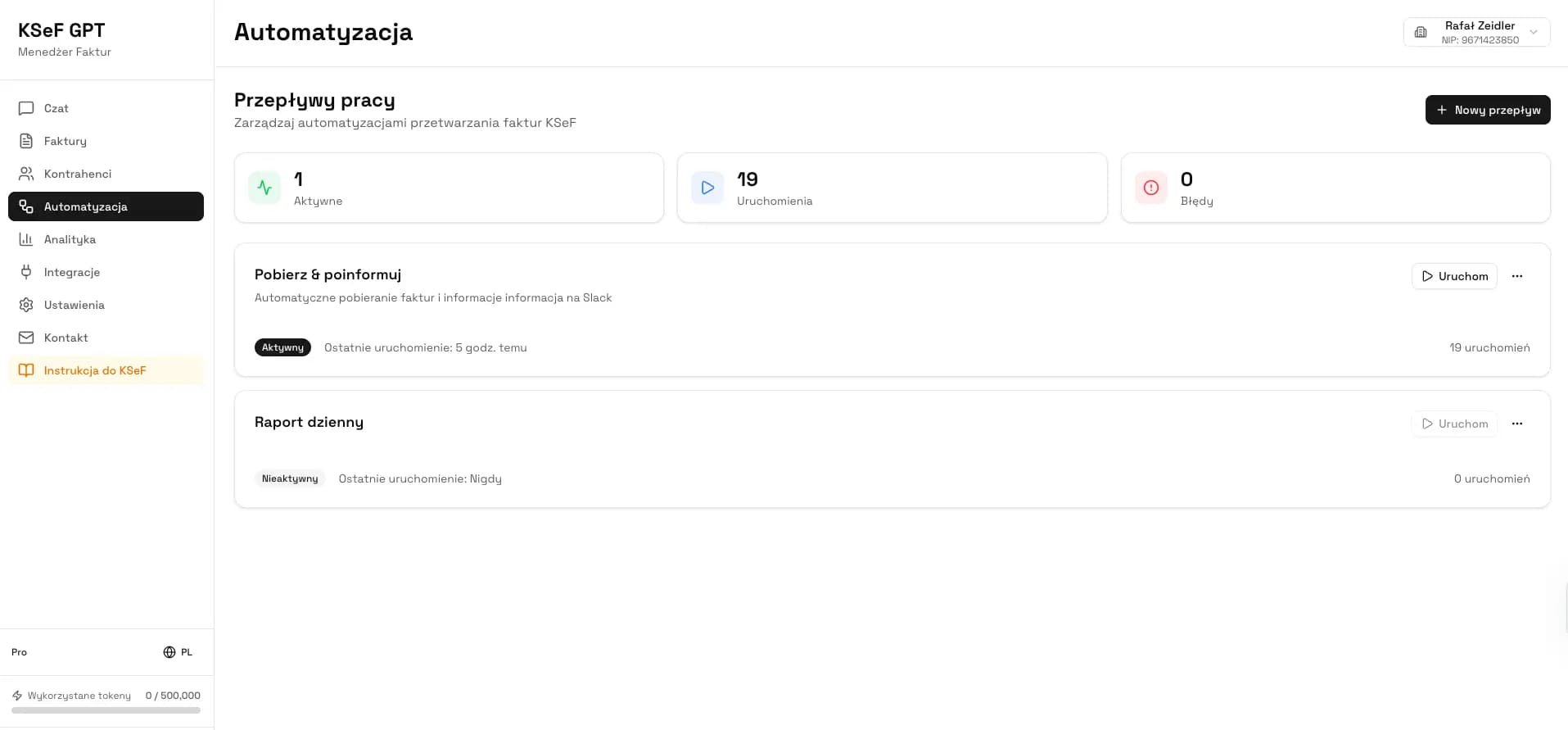
Automation: create a trigger, condition and action in KSeFGPT Automation.
Alert: test email, Slack, Telegram or a webhook with the relevant KSeFGPT integrations.
Organisation: invite another person. Users work through separate accounts in one KSeFGPT organisation, not through shared credentials.
This trial tests a complete flow: submission, retrieval, reaction, automation and cooperation without manually moving data between tools.
After 7 days, compare the result with the price, plan limits and your actual requirements. That is the point at which a paid system can be assessed fairly against a free form.
| Test stage | Action | What to assess |
|---|---|---|
| 1. Access | Connect a company and retrieve documents | Data scope and ease of setup |
| 2. Submission | Send ready XML to KSeF | Status, KSeF number, UPO and import limits |
| 3. AI | Ask about invoices or request an allowed action | Whether it reduces real work |
| 4. Workflow | Combine an event, condition and action | Whether it matches company rules |
| 5. Organisation | Invite a user with a separate account | Permissions, groups and clear responsibility |
Test the complete KSeF process for 7 days
Use your own process to test AI Chat, automation, alerts and separate user accounts in an organisation.
Create an accountFrequently asked questions
Which free program does not limit submissions to KSeF?
In the offers checked on August 14, 2026, inFakt stated that its plan for new customers had no document or KSeF submission limit. The Ministry of Finance did not publish a user-plan limit for Aplikacja Podatnika KSeF 2.0. This does not rule out separate limits on document creation, imports, retrieval frequency or users.
Will free software notify me about a new KSeF invoice?
Not always. KSeF itself does not automatically send an alert about a newly received invoice. Software must check KSeF, detect the document and trigger a message. Retrieval frequency and notification channels vary by product and plan. Fakturownia confirms email and push notifications for the account owner with its free KSeF integration; automatic retrieval runs every 15 minutes and a notification follows detection.
Does free KSeF software include an AI assistant?
We found no confirmed native AI chat that works with invoice data in the compared PLN 0 plans. KSeFGPT provides this feature during a 7-day trial of PRO functions, but KSeFGPT is not permanently free software.
Can several people work in one KSeF invoicing program?
Yes, if the selected plan supports team work. KSeF permissions are not automatically the same as a shared product organisation. In KSeFGPT, users work through separate accounts inside one organisation, with groups, permissions and an activity history. In Fakturownia Micro, one system Accountant-role account is available outside the one-user limit. This is an accountant exception, not unlimited team access.
Recommended reading
Free invoice submission to KSeF - compare tools when the submission step is your main concern.
New invoice notifications in KSeF - learn why KSeF sends no native alert and how software can start a process.
KSeFGPT: invoice import, export, analytics and AI - explore functions beyond basic submission.
KSeF for small businesses - review software-selection and accountant-cooperation criteria.
Test AI, automation and team organisation in practice
An eligible new account can use its own invoice flow to test KSeFGPT PRO functions for 7 days.
Start the 7-day trialSources
The baseline comparison uses public pricing and help materials checked on August 14, 2026. The September 18 update covers only Fakturownia KSeF retrieval, notifications and Accountant-role access, documented in the first two sources. Other entries and features retain their August 14, 2026 reference date.
- Fakturownia: retrieving KSeF purchase invoices and notifications
Fakturownia · accessed: September 18, 2026
Automatic retrieval every 15 minutes and email/mobile push notifications for the account owner.
- Aplikacja Podatnika KSeF 2.0
Polish Ministry of Finance · accessed: August 14, 2026
Official description of the free application for issuing, retrieving and viewing structured invoices.
- KSeF taxpayer application and other tools
Polish Ministry of Finance · accessed: August 14, 2026
Official overview of Ministry tools, including Aplikacja Podatnika KSeF 2.0 and e-mikrofirma.
- KSeF 2.0 Manual, Part II
Polish Ministry of Finance · accessed: August 14, 2026
Official manual confirming, among other points, that KSeF does not automatically send a system notification about a new invoice.