How to choose a CRM for your small business: contacts, deals and tasks
Keep customer information and next steps organized. Find out what your team should test before buying and how to prepare for the move from Excel.
Article summary
Choose a CRM, or customer relationship management system, in which you can find the customer, notes from conversations, the current sales opportunity and the next action. Also check staff access, imports, exports and the cost of a plan that includes the features you need. Run a pilot with a small data sample before buying.
Excel may still be enough if your process is simple and both the information and responsibilities are clear. Difficulty managing customer work is a better reason to try a CRM than the number of customers or employees alone.
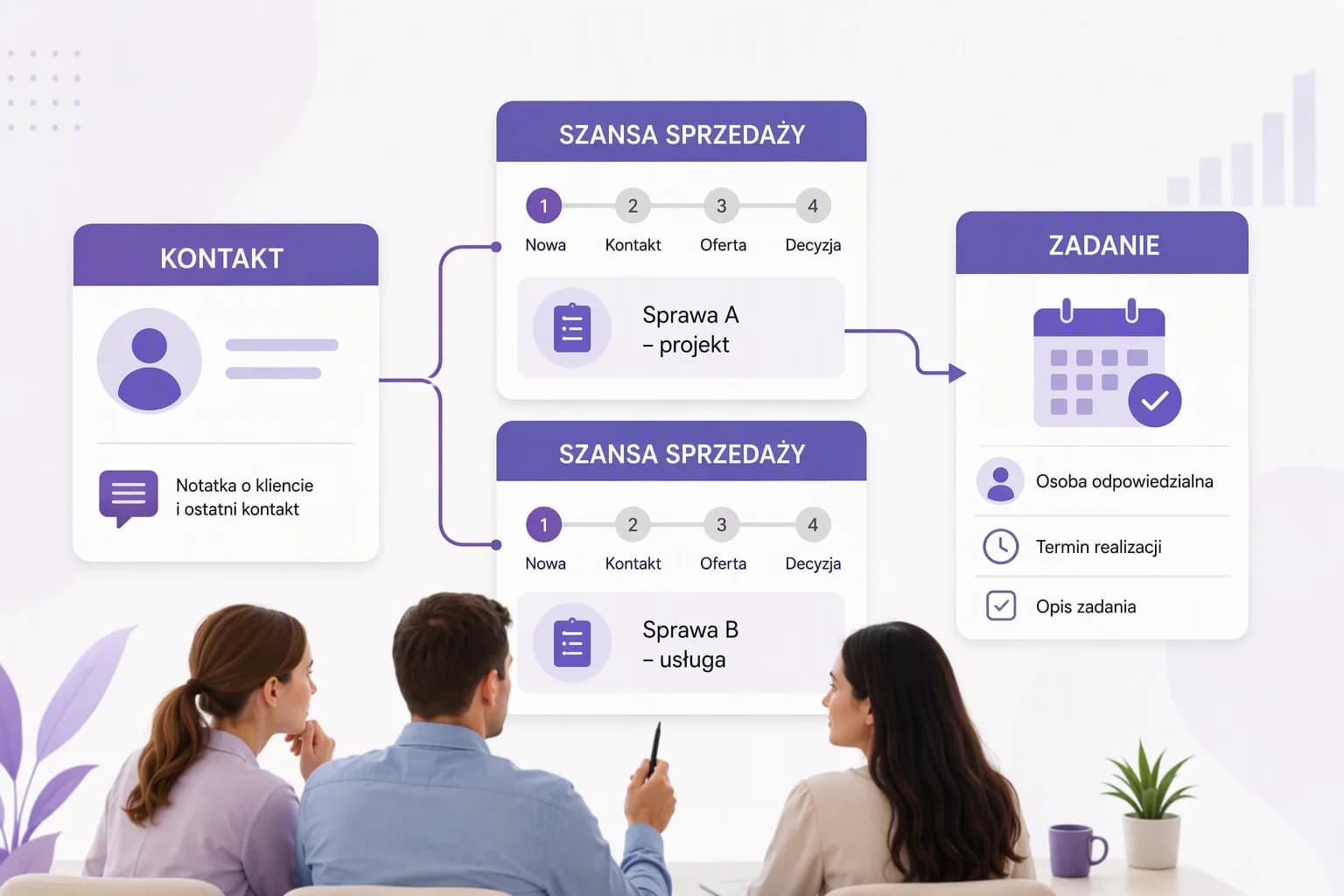
Compare small business CRMs using the same work scenario rather than the length of their feature lists. A contact, an individual deal and a task serve different purposes. Check whether the system lets you connect them in a way your team understands.
Start with a customer's enquiry, not a feature list
A customer speaks to one person, another sends the proposal, and the details remain scattered across email and a spreadsheet. At the next contact, someone has to reconstruct what was agreed and who was supposed to call. This is a useful scenario for assessing a CRM: can another person continue the work without guessing? Below, you will find a table of criteria, an example of team collaboration and a suggested pilot.
The examples of Pipedrive features, imports and billing are based on documentation checked on October 2, 2026. They illustrate what to ask a provider when choosing a CRM; the terms of other systems may differ.
Contents
Key takeaways
You should be able to distinguish two enquiries from the same customer without changing the status of the entire company. Use one contact and two separate sales opportunities in your pilot.
Handing work over to another person tests more than a demonstration led by the provider. Ask a colleague to find the agreed details, the person responsible and the next action independently.
Assess imports and exports by the content and relationships in the data, not just the record count. Note any missing information and any data that requires a separate export.
An unresolved gap in an essential feature is a reason to hold off on buying. Distinguish it from configuration or working practices that your team can improve.
CRM or Excel?
Start with a few current customer enquiries. For each one, can you identify the person managing it, the latest agreed details, the sales stage and the next step? Could a colleague who was not involved in the conversation find that information too?
If the answers are clear, a spreadsheet may still meet your business's needs. You do not have to change tools just because your contact list has grown. However, if the spreadsheet contains customer details while the agreed actions have to be retrieved from messages or private notes, it is worth testing a shared system.
In particular, check whether you encounter any of these difficulties:
It is unclear who is currently handling the enquiry.
One company has several orders, but the spreadsheet gives it only one status.
A proposal has been sent, but no follow-up date has been agreed.
The conversation history is hard to find when a colleague is absent.
Different people save the same data in several places.
During the pilot, ask a colleague to record a conversation and schedule an action. This will show whether everyday use requires constant help from the person configuring the system.
Contacts, sales opportunities and tasks serve different purposes
A contact identifies the person you speak to. A company identifies the organization involved. A sales opportunity, often called a deal, represents a specific potential order, such as a training course or a service engagement. A task describes an action to complete. Separating these details helps you assess a system without confusing a customer with the outcome of a single deal. Check how each CRM organizes its own data.
In Pipedrive's model, people, organizations and deals are separate, linked items. One person can have several open deals. A deal progresses through sales stages until it is won or lost, while an activity, such as a call or meeting, can be scheduled and linked to a person, organization or deal, among other items.
| Item | The question it answers | Hypothetical example |
|---|---|---|
| Contact person | Who are you agreeing the details with? | The person ordering a service at the customer's company |
| Company | Which business does the relationship concern? | A company ordering training courses |
| Sales opportunity | Which specific deal are you working on? | A training course for a new team |
| Task | What needs to happen next? | Call about the proposal on the agreed date |
How should you record contact history?
After a conversation, record its date, the main points agreed and the next step. Attach the note to the correct customer or enquiry, and add an agreed call as a task with a due date. Another person should be able to distinguish the details of two different orders from the same customer.
Notes from calls and email history may enter the CRM in different ways. During the pilot, check which information needs to be added manually and which is retrieved through a connection to your mailbox.
Pipedrive documents bringing messages into the system through email sync or Smart Bcc, a way to forward copies of messages to the CRM, depending on the plan. Some features require a particular subscription. For the offer you are considering, check notes, email history and the way that history is added separately.
What should you check before choosing a CRM?
Identify what is essential to your customer work. Then give each provider the same scenario and test it in the plan you intend to buy. A demonstration using a different plan does not establish what your offer includes.
Use the table below to compare offers. For each test, record the result, any gaps and questions that need clarification. A promise to add an essential feature in the future is not a substitute for having it available.
| Criterion | Question for the provider | Pilot test |
|---|---|---|
| Contacts and companies | How do we link several people and several enquiries to one company? | Create a company, a contact person and two separate enquiries. Check the links. |
| Conversation and email history | How are notes and messages recorded? What requires synchronization or a different plan? | Add a note after a conversation and check how to save a sample email. |
| Deals and stages | Can stages be adapted to our process? How is the outcome of a deal recorded? | Create a deal, change its stage and check that another person understands its status. |
| Tasks | Does a task have a due date and an assigned person? How is it linked to the work? | Schedule a follow-up and find it from the assigned person's account. |
| Roles and visibility | Who can read, edit and export data? | Check the same enquiry from the accounts of two people with the roles you need. |
| Imports and data quality | What are the formats, limits, required fields and rules for duplicates? | Import a small sample from a copy of your spreadsheet. Check errors and links. |
| Exports and data coverage | How do we download contacts, deals, activities, notes and files? | Export the sample and compare its contents with the stored data. |
| Data protection | Is an additional sign-in verification step available? Who backs up the data, and how is it restored? | Check account security settings and obtain a description of the data recovery procedure. |
| Leaving the provider | How long after cancellation can we download our data, and when will it be deleted? | Confirm the termination terms and plan an export before access ends. |
| The cost of the required plan | What are we paying for, and which features does the offer include for the whole team? | Confirm the number of billable units and the availability of all essential features. |
| Setup and working practices | What can we configure ourselves, and where is help available? | Recreate the process with another person without guiding them through every step. |
What might working together on a customer enquiry look like?
Imagine a small service business that provides training for business customers. This is a hypothetical example of organizing work, not an account of an actual implementation or a test of a particular application.
An employee records the customer's company and the person they spoke to. After the call, they add a note: the customer needs training for a new team, expects a proposed scope and wants to discuss the proposal on Friday. The employee then creates a deal for that course instead of changing the status of the entire company to Proposal.
After sending the proposal, they set the stage to Proposal and schedule a follow-up task for Friday, assigned to a specific person. The stage name is a suggestion. In your business, a stage should correspond to an actual event that employees can recognize.
A colleague takes over while the person handling the enquiry is absent. They should be able to find the contact, the latest agreed details, the correct deal and the scheduled call. If they have to ask the customer again for information already given to the company, check whether a missing note, an incorrect link or restricted access is the cause.
In this example, the expected test outcome is specific: the colleague covering the work finds the training proposal and knows they should discuss its scope on Friday. A second order from the same customer remains a separate deal. That result shows that the recorded information lets someone continue the work; simply adding a contact does not test this.
Test this process on a small sample
Recreate one customer enquiry and hand it over to another person. Test imports and exports before moving the entire database.
Go to the pilot stepsHow should you test a CRM during a pilot?
The pilot should establish whether the system fits the way your team works. It does not need to include your whole database or every available feature. Prepare a small sample covering an ordinary enquiry, several deals with the same customer and a situation that requires handing over responsibility. You can start with demonstration data.
1. Recreate a customer enquiry. Record the company, contact, note, deal and next action. Check that the information appears in the right places.
2. Involve another person. Ask them to find the agreed details independently and explain what needs to happen next. Also check that they see only the data they need.
3. Change the stage and responsibility. Establish whether it remains clear who is handling the enquiry and who will complete the task.
4. Run a test import. Check column mapping, links, duplicates and records skipped by the system.
5. Run a test export. Open the downloaded data and compare it with your sample, including notes, activities and files where needed.
6. Record the result. Separate missing features from configuration problems and working practices that have not yet been agreed.
The pilot can provide enough information for a decision when the team can find agreed details and next steps, visibility meets your needs, and errors and missing data have been identified. Resolve outstanding essential issues before buying. A successful contact import alone is not enough to assess the whole process.
How can you move from Excel without losing data relationships?
Keep a copy of the spreadsheet and first define the scope of the migration. Are you moving only contacts, or also companies, open deals, notes and activities? Each may need a different set of fields. Do not treat every column in the old spreadsheet as a mandatory field in the new system.
In the hypothetical migration of the training business, one row contains a company, a contact person and the subject of an order. Before importing, decide which data describes the contact, which describes the company and which describes a particular deal. This helps avoid treating two training courses for the same customer as two independent companies.
Pipedrive's import documentation describes preparing the spreadsheet structure, completing required fields, mapping columns, previewing relationships and choosing how to handle duplicates. Skipped rows are placed in a file with the reason for each error; after correction, they can be imported again.
Importing into this system requires the appropriate global permission. Pipedrive specifies XLS, XLSX or CSV files, one worksheet per import, column headers, no more than 50,000 rows and a file size below 50 MB. These are Pipedrive's conditions. Check each other CRM's own requirements.
Break data preparation into these activities:
Standardize the data: tidy up company names, contact details and the meaning of statuses.
Identify duplicates: use available identifiers, such as email addresses or phone numbers, and check the record-merging rules.
Match the fields: map columns to the correct items in the system and create any custom fields you need before importing.
Check the sample: review not just the number of records, but their content and relationships too.
Handle errors: establish which data was skipped, why, and how to correct it.
Test exports before completing the migration. In Pipedrive, a user with export permission can download only data that is visible to them. The documentation describes XLSX or CSV exports, while activities, notes and files linked to contacts and deals require separate exports.
For that reason, do not treat a single spreadsheet as a complete backup that can restore the account. If being able to change systems matters to you, check what data you can download, whether its relationships are preserved and how to move it to another tool.
How much will a CRM cost for the whole team?
Ask for a quote covering all the people and features needed in your pilot. The price of the basic plan alone does not tell you what your process will cost. Also check how billing changes when an employee joins or leaves.
Pipedrive calculates the subscription according to the number of seats in the account. There may be fewer active users than paid seats. This is a specific example of why you need to distinguish people actually using the system from the units being billed; do not assume every provider uses this model.
Before deciding, confirm:
The billing unit and the number of billable units for the whole team.
The plan that includes the required features, especially email history and the way you need to work with email.
The billing period, the commitment period and the terms for changing the subscription's scope.
Any fees for add-ons, configuration, training and migration assistance.
The support included in the offer.
Also allow for your team's time spent cleaning up data, configuring the system and learning to use it. This is part of implementation planning even when it does not appear as a separate line on the provider's invoice.
Compare offers over the same period, such as the first year: the plan fee for the whole team plus add-ons, migration, configuration and training. Calculate the following year separately, excluding one-time setup costs. Compare amounts consistently either excluding or including VAT.
If you are considering KSeFGPT, check the plan features and limits. Compare them with the requirements established during the pilot rather than assuming every plan includes every area.
How do you make a CRM part of everyday work?
Moving contacts does not establish who should keep the data up to date. Before extending use to the whole team, agree on a few simple practices: who owns each enquiry, when they record agreed details and how they schedule the next action.
Sales stages should mean the same thing to everyone. For example, the suggested Proposal stage could mean that a specific proposal has been sent to the customer, rather than that someone has merely started preparing it. Choose a meaning that suits your business and describe it in one sentence.
Also decide when conversations should be recorded and how customer work is handed over. When taking over an enquiry, check both the person handling it and the person responsible for the next task. Do not assume that changing one field will automatically change the others.
Once the team starts working together, review a few enquiries and check that the next step is clear for each. If employees keep important details outside the CRM, find out why: unclear practices, too many required fields, access problems or a missing way to record the information they need.
Where can you check how a CRM connects with invoicing?
If you also need a tool for sales documents, test invoicing separately. The phrase CRM with KSeF invoicing does not establish which data is transferred, whether an invoice is linked to a deal or which event changes that deal's status. KSeF is Poland's National e-Invoicing System. What matters here is how the processes connect, not simply whether both features appear in the offer.
The KSeFGPT CRM module page introduces counterparties, sales opportunities and tasks. Separate instructions cover specific actions: adding a note to a counterparty, creating a sales opportunity and adding a task with a due date.
The guide to issuing an invoice from CRM describes starting from a counterparty's record and transferring the buyer's details into the invoice form. Line items, dates and payment details still need to be completed or checked. An invoice issued this way is not automatically linked to a sales opportunity.
If you also need to link the document to a specific deal and change that deal's status, include those actions in the pilot. Issuing an invoice for a counterparty alone does not confirm that the entire sales process is supported.
Our comparison of KSeF software for small businesses expands on document-handling criteria. It is useful if you want one tool for working with customers and invoices.
Frequently asked questions
Does a one-person business need a CRM?
Not always. If you handle a simple process yourself and can easily find agreed details and next actions, a spreadsheet may be enough. A CRM is worth testing when it becomes hard to keep several enquiries from the same customer separate, retain contact history or keep track of the next steps.
What should I check when importing from Excel?
Check the format, limits, required fields, column mapping, relationships and duplicate rules. Start with a copy of a small sample. After importing, compare the content of the records and investigate skipped data instead of checking only how many contacts were added.
Does an export include all data?
Do not assume it does. The scope may depend on permissions, record visibility and the type of export. In Pipedrive, activities, notes and files linked to contacts and deals require separate exports. A single spreadsheet should not be treated as a complete backup that can restore the account.
How do I calculate the cost of a CRM for my team?
Confirm the billing unit, the number of billable units, the plan you need and the commitment period. Ask about any add-ons and assistance with setup, training and migration. Include your own team's time too. In Pipedrive, the number of paid seats can exceed the number of active users.
Recommended reading
Preparing your data and choosing a CRM are related but separate tasks. Choose what to read next according to what you want to organize:
Preparing a customer database for migration expands on cleaning and mapping data before moving it.
Counterparty data and transaction history explores the distinction between a customer record and events recorded in invoices.
Handling invoices in a small business provides the wider KSeF context if you are choosing a CRM alongside organizing invoicing.
Creating a sales opportunity in CRM explains a specific action in KSeFGPT and can help you recreate part of the pilot scenario.
What should you do before buying?
Identify your most important needs and compare offers using the same sample process. Run a pilot, clarify gaps, check imports and exports, and confirm the cost of the full plan you need. Then plan how to move the remaining data and begin working together.
Do not choose a system simply because it has the most capabilities. Choose one that lets you manage the work you need to do, with information, responsibilities and next steps that your team understands.
Test KSeFGPT CRM using your own scenario
Sign in and compare the CRM features available to you with your business's needs. With a plan that includes sales opportunities and tasks, recreate the customer enquiry described here and hand it over to another person.
Open KSeFGPTSources
Information as of October 2, 2026. Pipedrive's article on data organization, updated on September 23, 2026, describes the data model and subscription requirements for some features. The separate document Importing data into Pipedrive with spreadsheets describes import conditions and the handling of skipped rows. Exporting data from Pipedrive covers permissions, visibility and separate exports. What is the difference between a user and a seat? explains seat billing. These three documents were updated on September 3, 2026; all were accessed on October 2, 2026. They describe one provider's conditions, not rules that apply to all CRMs.
- Pipedrive: data organization and relationships between contacts, deals and activities
Pipedrive · accessed: October 2, 2026
Updated on September 23, 2026. Explains the data model and how access to some features and ways of bringing in email depends on the subscription.