Free PDF to XML KSeF Converter - FA(3) Online in 2026
Free PDF to XML KSeF converter - just an email address. Step by step: how to turn a PDF invoice into FA(3) and submit it to KSeF in 2026.
Summary
Key takeaway: KSeF (Poland's National e-Invoicing System) does not accept PDF invoices - it requires XML files compliant with the FA(3) logical schema, which has replaced FA(2) since February 1, 2026. A free PDF-to-XML converter lets you turn an existing PDF invoice into a file ready for submission to the Ministry of Finance gateway.
Practical advice: KSeFGPT offers a free PDF-to-XML converter. Just provide an email address - no need to create a full account. The public free tools share a limit of 2 uses within 24 hours. After uploading the file, AI recognizes the invoice fields, you verify them, and you download the ready FA(3) XML.
Warning: generating an XML file does not mean it was sent to KSeF. Conversion and submission are two separate steps - after downloading the XML you must transmit it to KSeF via the Ministry of Finance Taxpayer Application, your own accounting software, or a paid KSeFGPT plan with a separate submission step. Always validate the file before sending.
Why you need a PDF-to-XML converter for KSeF
Whether an invoice must enter KSeF depends on the applicable rules and exceptions, not on the source file format. This guide concerns preparing your own invoice intended for KSeF.
Distinguishing sales from purchases prevents misuse of a converter. Your own invoice may need preparation for KSeF submission. A supplier PDF may need data extraction for bookkeeping, but it does not become your sales invoice.
This guide walks you through the free conversion of a PDF invoice into an FA(3) XML file. It shows when a converter is actually needed (and when it is not), how to choose a tool, what to look at during validation, and compares the main free options: KSeFGPT, the Ministry of Finance Taxpayer Application, and generic converters such as Aspose or CloudConvert.
What KSeF actually requires: PDF or FA(3) XML?
Several terms around KSeF are commonly confused. Telling them apart is the foundation on which everything else rests.
A PDF is a visualization of a document. It may look great graphically and be electronically signed and sent by email - but under the new KSeF rules it is only an image of an invoice, not the invoice itself. KSeF does not accept it.
An electronic invoice is any digital document meeting the legal requirements (e.g. a PDF with a qualified signature sent by email). This is a broader concept than KSeF and existed before its introduction.
A structured invoice (faktura ustrukturyzowana) is narrowly defined: an XML file compliant with the FA(3) schema, transmitted to KSeF and assigned a unique KSeF number. Only this form fulfills the obligation under the Polish VAT Act from February 1, 2026 (large companies) and April 1, 2026 (all other VAT taxpayers).
The FA(3) schema has applied since February 1, 2026, replacing FA(2). Every XML file submitted to KSeF must use the namespace required by FA(3) - the current URI is published at ksef.podatki.gov.pl/pliki-do-pobrania-ksef-20. If the converter generates files in the older FA(2) format, they will be rejected by the gateway.
When you need a PDF-to-XML converter
Not everyone needs a PDF-to-XML converter. Many companies can skip this step entirely if their accounting process is already integrated with KSeF. The three questions below help you decide in 30 seconds.
Question 1: Are your sales invoices already created in an ERP or accounting program with KSeF integration (e.g. Comarch, enova, Symfonia, iFirma)? If YES - no converter needed. Your program exports FA(3) XML and transmits it to KSeF directly. If NO - go to question 2.
Question 2: Are these your own sales invoices prepared as PDFs, or received purchase invoices? An FA(3) converter helps prepare your own invoice for submission. Do not reissue a supplier invoice as your own sale. For bookkeeping, retrieve it from KSeF or use purchase import/OCR in the format required by your accounting software.
Question 3: Can you issue the invoice directly in a form? The Ministry Taxpayer Application allows this without an intermediate PDF. For recurring conversion, check the monthly PDF allowance, company count and draft review before submission separately.
| Scenario | Recommended tool | Cost |
|---|---|---|
| Sales invoices in an ERP with KSeF integration | Your accounting program - no converter | ERP license |
| Cost invoices from counterparties in PDF | Purchase OCR or import into accounting software | Depends on the format and offer |
| Fewer than 5 invoices per month, manual | Ministry of Finance Taxpayer Application | PLN 0 |
| Dozens to hundreds of invoices per month | Plan matched to PDF volume and company count | Individual offer beyond the limits |
| Accounting firm serving multiple clients | Plan matched to PDF volume and company count | Individual offer beyond the limits |
Step by step: converting a PDF invoice to XML in KSeFGPT
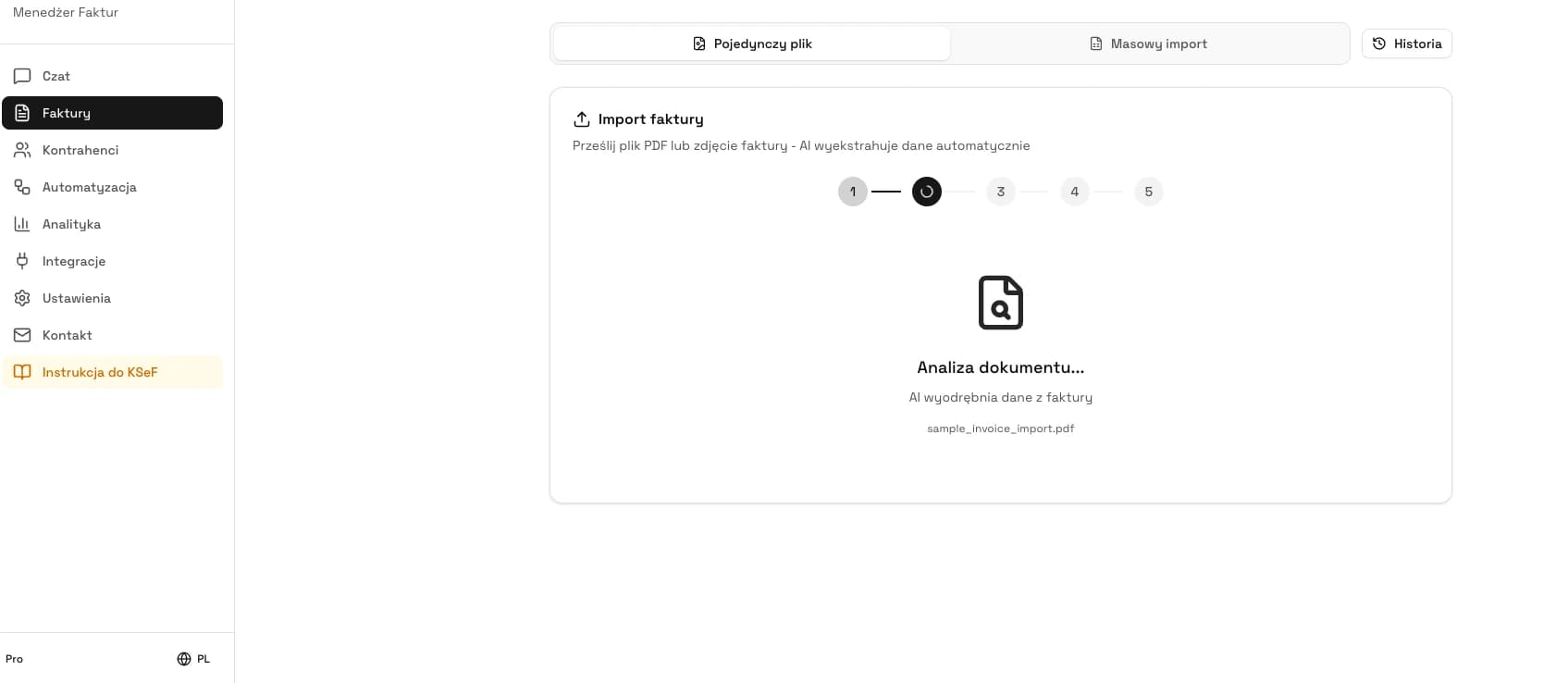
Below is the full conversion process in the free KSeFGPT converter. It takes from 30 seconds to a few minutes depending on invoice complexity.
Step 1 - prepare the PDF file. For scans aim for at least 300 DPI. If the invoice is multi-page, merge pages into a single document. Heavy watermarks can overlap key data - use clean versions when possible. The KSeFGPT converter accepts PDF files (application/pdf).
Step 2: open the free PDF to XML KSeF converter and provide an email address. Public free tools share 2 uses within 24 hours. A full account is not required.
Step 3 - upload the PDF (drag-and-drop or click). The AI reads the invoice structure: seller and buyer NIP (Polish tax identification number), entity names, issue date (P_1) and sale date (P_6), invoice number, line items (description, quantity, unit price, VAT rate, totals), bank account number, currency code. The tool is designed to recognize standard FA(3) fields, but flags any uncertain fields for manual review.
Step 4 - verify the recognized data in the preview. This is the critical moment. Check in particular: the NIP checksum (10 digits, no PL prefix), date format (YYYY-MM-DD), VAT rate codes (per the Ministry dictionary), mathematical consistency (net + VAT = gross to the penny), exchange rate (for non-PLN invoices). Flagged fields are highlighted - correct them manually.
Step 5 - download the FA(3) XML file. You can save it to disk and import into your accounting program or submit via the Ministry of Finance Taxpayer Application. On a paid KSeFGPT plan you can submit directly to KSeF from the app. Remember: download is not submission - they are two separate steps.
Before submitting to KSeF, run a validator. KSeFGPT also offers a free XML validator - it checks compliance with the current FA(3) schema, field formats, and checksums.
Comparison of free PDF-to-XML converters
On the market in 2026 you have three realistic free paths for converting a PDF invoice to FA(3) XML. Each has its own profile of convenience and limitations. State of the offering - May 2026.
KSeFGPT (free converter) - after providing an email address, you use the shared limit of 2 public free-tool uses within 24 hours; the converter generates files in the full FA(3) schema. KSeF Taxpayer Application (official Ministry of Finance free tool) - free, run by the Ministry, but does not convert PDFs - it lets you enter invoice data manually and generate XML. Generic converters (Aspose, CloudConvert) - convert any PDF to XML but do not know the FA(3) schema - they generate non-compliant XML.
| Feature | KSeFGPT | MF Taxpayer Application | Generic (Aspose, CloudConvert) |
|---|---|---|---|
| Free tier | 2 total uses / 24h after providing an email address | Free - manual entry | Usually conversion limit on free plan |
| Registration | Email address only (no full account) | Authentication via official MF login | Usually required |
| FA(3) schema | Yes | Yes | No - generic XML |
| Input format | No conversion - manual entry | PDF (and others) | |
| Validation before download | Yes (XML validator) | Yes (during manual entry) | None |
| Submission to KSeF | Yes (paid plans) | Yes | None |
Checklist: what a valid FA(3) XML file must contain
No matter which converter you use, the generated XML file must meet a set of structural requirements. The checklist below covers mandatory fields most often checked in XSD validation and Ministry of Finance business rules.
1. Namespace compliant with the FA(3) schema - current URI published at ksef.podatki.gov.pl/pliki-do-pobrania-ksef-20. A file with the FA(2) namespace will be rejected.
2. System code in the header - indicating the FA(3) schema version.
3. Seller NIP (Polish tax ID) - 10 consecutive digits, no country prefix, with a valid checksum.
4. Buyer NIP (or alternative identifier) - for individuals without business activity, the buyer-without-NIP flag is required.
5. Issue date P_1 in ISO 8601 format (YYYY-MM-DD). Entries like 15.04.2026 or 15/04/2026 are rejected.
6. Sale date P_6 - required if different from the issue date.
7. Line items with description up to 512 characters (FA(3) extended the limit from the 256 characters in FA(2)).
8. VAT rate: use a permitted value in the appropriate FA(3) field. Check the schema dictionary; do not append a percent sign to the XML value.
9. Mathematical consistency - the sum of net items and tax must match the gross amount to the penny.
10. Bank account number - up to 34 characters (FA(3) extended the field for IBAN and foreign accounts).
11. Currency code per ISO 4217 (PLN, EUR, USD, GBP). For foreign currencies - the conversion rate.
12. Optional attachments - FA(3) allows up to 5 attachments, each up to 10 MB. The XML file itself: up to 3 MB without attachments, up to 60 MB before compression when attachments are included.
What most often breaks FA(3) XML after conversion
Conversion from PDF to XML is never 100% error-free - quality depends on the source file, the counterparty's invoice layout, and how well the converter understands FA(3) fields. Below are the six most common post-conversion errors and how to fix them.
1. Incorrect NIP checksum - the converter misread one digit or swapped two adjacent ones. Diagnosis: the validator returns an invalid-NIP message. Fix: verify the NIP on the official taxpayer registry and correct manually before downloading the XML.
2. VAT rate outside the FA(3) dictionary: check the value in the appropriate field without appending a percent sign. Replacing numeric values with letters does not fix the file. Compare the result with the schema documentation and source invoice.
3. Wrong date format - 15.04.2026 instead of 2026-04-15. Common with invoices from foreign counterparties. Fix: correct in the preview before downloading.
4. Currency: verify the ISO 4217 code, amounts and the conversion rules applicable to the transaction. Do not assume that every invoice uses the exchange rate from the day before issuance.
5. Mathematical inconsistency - the sum of net items and VAT differs from the gross amount by 1 penny. Fix: recalculate items with 2-decimal precision using banker's rounding.
6. FA(2) namespace instead of FA(3) - the converter has not been updated to the schema in force since February 1, 2026. Diagnosis: the gateway returns a schema mismatch error. Fix: use a converter that supports FA(3) (e.g. KSeFGPT, updated ERP).
After every conversion, run the validator. KSeFGPT offers a free XML validator that checks compliance with the current FA(3) schema, field formats, checksums, and business rules.
When the free converter is no longer enough
Occasional documents: KSeFGPT public tools require an email address and share 2 uses within 24 hours. Conversion and validation use the same allowance. A low monthly volume alone does not guarantee that every operation fits within the limit.
As of September 19, 2026, Medium includes 20 PDF imports per month and 1 company for PLN 99 net/month; Pro includes 100 PDF imports and 2 companies for PLN 499 net/month. Higher volume or more companies requires an individually agreed Enterprise offer. Spreadsheet import allowances are separate and do not increase the PDF allowance.
PDF queue: files are added individually and processed in the background. The resulting drafts require data review and a separate submission decision. Spreadsheet import with column mapping is a different process.
Check current terms on the KSeFGPT pricing page.
Before choosing a tool, test a sample of your own documents, manual review time and import into the destination system. Stop archive-invoice tests after checking the data; do not submit those invoices again to production KSeF.
| Volume / scenario | Recommendation | Monthly fee and allowance |
|---|---|---|
| Public free tools | Occasional documents: KSeFGPT public tools require an email address and share 2 uses within 24 hours. Conversion and validation use the same allowance. A low monthly volume alone does not guarantee that every operation fits within the limit. | PLN 0; 2 shared uses / 24 h |
| Medium: 20 PDFs and 1 company | Plan matched to PDF volume and company count | PLN 99 net/month |
| Pro: 100 PDFs and 2 companies | Plan matched to PDF volume and company count | PLN 499 net/month |
Security: what happens to your PDF after upload
An invoice contains personal data (NIP, counterparty name, address, transaction value) - protected under GDPR. By uploading a PDF to a free converter you entrust that data to an external tool, so security matters when choosing one.
Good practices to require from a converter: encrypted transmission (HTTPS/TLS), servers located in the European Union, automatic deletion of uploaded files after conversion, a clear privacy policy describing retention periods, and no sharing of data with third parties.
KSeFGPT processes files in the browser session and does not retain files from the free converter long term. See the current privacy policy at /en/privacy-policy. For especially sensitive documents (e.g. medical data, information covered by professional secrecy), consider anonymization before upload or use an on-premise solution.
What KSeFGPT offers beyond the free converter
The free PDF-to-XML converter is just one of KSeFGPT's public tools - others, including the XML validator, are available on the free tools page. Each launches after you provide an email address. The full KSeFGPT platform, however, offers a much broader feature set for taxpayers and accounting firms.
AI assistant - a chat interface for KSeF that answers questions about regulations, deadlines, validation errors, and procedures.
PDF queue: files are added individually and processed in the background. The resulting drafts require data review and a separate submission decision. Spreadsheet import with column mapping is a different process.
KSeF integration - direct submission of invoices to the Ministry gateway, downloading cost invoices, automatic UPO retrieval, status monitoring.
KPiR and revenue analytics - dashboards summarizing data from KSeF: revenues, costs, VAT structure, counterparties.
Automations (workflows) - event triggers (new invoice, status change) with actions in Slack, Telegram, email, or your own webhook.
As of September 19, 2026, Medium includes 20 PDF imports per month and 1 company for PLN 99 net/month; Pro includes 100 PDF imports and 2 companies for PLN 499 net/month. Higher volume or more companies requires an individually agreed Enterprise offer. Spreadsheet import allowances are separate and do not increase the PDF allowance.
KSeF certificates and tokens - authorization management without manually keeping track of tokens.
Paid plans with a 7-day free PRO trial - test the full functionality before deciding.
Convert a PDF invoice to KSeF XML now - free tool with email
Upload a PDF and download FA(3) XML ready to submit. Shared free-tool limit: 2 uses within 24 hours. No full account, no payment.
Open the converterExpert perspective: PDF conversion in practice in 2026
Distinguishing sales from purchases prevents misuse of a converter. Your own invoice may need preparation for KSeF submission. A supplier PDF may need data extraction for bookkeeping, but it does not become your sales invoice.
The second common pattern is companies that issued invoices for years in tools without KSeF integration (e.g. Word or Excel, older versions of accounting programs). Here the PDF-to-XML converter is a temporary bridge - it lets you meet the obligation before moving to a modern accounting system with native integration.
For multiple clients, assess the number of tax identities, employee permissions, PDF allowance and draft correction rules. Queue processing does not promise unlimited volume or submission without review.
Before choosing a tool, test a sample of your own documents, manual review time and import into the destination system. Stop archive-invoice tests after checking the data; do not submit those invoices again to production KSeF.
Frequently asked questions
Is the free PDF-to-XML KSeF converter really free?
KSeFGPT offers a free PDF-to-XML converter - just provide an email address, no full account, no payment. The public free tools share a limit of 2 uses within 24 hours.
Do I need to register to convert a PDF to KSeF XML?
In the KSeFGPT free converter, just provide an email address - no full account required. The Ministry of Finance Taxpayer Application requires authentication via official MF login methods.
What file formats does the PDF-to-XML KSeF converter support?
The KSeFGPT free converter accepts PDF files (application/pdf). For scans, the recommended resolution is at least 300 DPI.
Does the converter automatically submit the XML to KSeF?
No. Conversion creates an XML file or draft; submission is a separate operation requiring appropriate authentication and permissions. In KSeFGPT you review the draft and approve sending it. The free converter only provides downloadable XML.
Will the XML from the free converter be accepted by KSeF?
Only if it is compliant with the FA(3) schema (in force since February 1, 2026) and passes technical (XSD) validation and Ministry business rules. Always run the file through an XML validator before submission - KSeFGPT offers a free XML validator.
Related articles
If you want to dig deeper into PDF-to-XML conversion and KSeF operations, start with these articles:
PDF to KSeF XML Converter - the sibling article with a descriptive approach to the tool, a video tutorial, and a market overview.
Can you send a PDF to KSeF? - detailed explanation of the differences between a PDF, an electronic invoice, and a structured invoice.
XML and the FA(3) format in KSeF - technical foundations of the FA(3) schema, mandatory and optional fields, namespace.
XML validation and processing in KSeF - how to verify the XML file before submitting it to the Ministry gateway.
Try the free PDF-to-XML KSeF converter - just an email address
Upload a PDF invoice and AI recognizes the data and generates an XML file compliant with the FA(3) schema. Shared free-tool limit: 2 uses within 24 hours. No full account, no payment.
Open the free converterExpert reviewed: Bogdan Mazurek
Tax advisor · May 13, 2026
Content reviewed for compliance with current KSeF 2.0 rules effective from February 1, 2026, and the FA(3) logical structure.