KSeF for freelancers and sole proprietors: B2B invoices, costs and obligations
When to issue B2B invoices, how to receive costs, track UPO, KSeF number and accountant collaboration.
Article summary
Freelancers and Polish sole proprietors should prepare two KSeF processes: issuing B2B sales invoices and receiving cost invoices on the business NIP. KSeF is not just another way to email a PDF to a client.
In practice, four elements matter most: FA(3) XML, KSeF number, UPO and a readable PDF visualisation. The PDF helps people read the document, but it does not replace the structured invoice or the acceptance confirmation from KSeF.
The safest process for a sole proprietor is a fixed routine: check incoming invoices, confirm costs, download UPO for your own sales invoices and send the accountant a complete data package. KSeFGPT can organise this workflow, but it does not replace an accountant or tax adviser.
KSeF for freelancers and sole proprietors in one sentence
If you issue B2B invoices as a Polish sole proprietor, you need to know when to issue them in KSeF, how to receive costs in the system and how to give your accountant the XML, PDF, KSeF number, UPO and document status.
This is not a generic guide to choosing software for a small company. It is a practical process for a self-employed developer, consultant, designer, copywriter, marketer or adviser who issues a few sales invoices per month and receives costs for tools, accounting, equipment or subcontractors.
Scope: domestic B2B invoices, cost invoices, foreign clients, the accountant, UPO, KSeF number and a monthly routine. For a wider software-selection perspective, start with KSeF for small businesses.
Table of contents
When freelancers and sole proprietors need KSeF
What do I issue as a sole proprietor
What changes in freelancer B2B invoices
Sole proprietor, accountant and accounting office
Foreign client and invoice in the counterparty language
Freelance developer and monthly KSeF rhythm
Is the Taxpayer Application enough
Key takeaways
The table below organises the decisions a freelancer should make before the first full month of work with KSeF.
| Point | Details |
|---|---|
| Dates | For most sole proprietors, mandatory issuing in KSeF starts on April 1, 2026, while receiving invoices in KSeF starts on February 1, 2026. |
| Format | A structured invoice is FA(3) XML. The PDF is a visualisation, the KSeF number identifies the document in the system and UPO confirms acceptance. |
| Costs | A freelancer should regularly check incoming invoices on the NIP, mark disputed documents and not wait only for an email from the supplier. |
| Accountant | The accounting office needs data and statuses: XML or export, PDF, KSeF number, UPO for sales, cost description and information on disputed documents. |
| Tool | The official MF app may be enough for a simple process. KSeFGPT makes sense when PDF/CSV/XML imports, more costs, UPO control and document organisation become important. |
When freelancers and sole proprietors need KSeF
As of June 22, 2026, mandatory issuing of invoices in KSeF is being introduced in stages. From February 1, 2026 it applies to taxpayers whose 2024 gross sales with VAT exceeded PLN 200 million. From April 1, 2026 it applies to the remaining taxpayers covered by the obligation.
For the smallest taxpayers, a transitional preference applies until the end of 2026: invoices can still be issued outside KSeF if, in a given month, total gross sales documented by invoices covered by KSeF do not exceed PLN 10,000. After the limit is exceeded, the invoice that exceeds the limit and later invoices are covered by the obligation.
Receiving invoices in KSeF must be treated separately. A postponement for issuing your own invoices does not postpone incoming invoices. A freelancer may still use the sales preference, while a cost invoice from a larger supplier can already be waiting in KSeF.
The key distinction is this: domestic B2B with a NIP generally leads to KSeF once the issuer is covered by the obligation. B2C is not the standard mandatory KSeF case. Foreign transactions require a careful check of the specific case.
| Freelancer situation | What it means | What to do now |
|---|---|---|
| A sole proprietor issues B2B invoices to Polish companies | Check whether the invoices are already covered by mandatory KSeF or the transitional preference. | Prepare the tool, permissions, numbering, UPO and data handover to the accountant. |
| A sole proprietor has very small invoiced sales | The PLN 10,000 gross monthly transitional preference may apply until the end of 2026. | Track monthly invoiced sales cumulatively so you do not miss the limit. |
| A sole proprietor receives cost invoices | Receiving invoices in KSeF applies from February 1, 2026. | Set a routine for checking incoming invoices and accepting costs. |
| A sole proprietor invoices consumers | B2C invoices are treated differently from domestic B2B. | Do not automatically mix them with the limit for invoices covered by mandatory KSeF. |
What do I issue as a sole proprietor
A freelancer should avoid one broad rule such as every invoice always goes to KSeF. It is safer to ask several questions: who is the buyer, whether they have a NIP, whether the invoice is covered by the obligation, whether the transitional preference applies and whether there is a foreign element.
Domestic B2B: a typical invoice for software development, consulting, marketing or design services to a Polish company with a NIP will generally need a KSeF process once the issuer is covered by the obligation.
B2C: consumer invoices should not be treated like the standard B2B KSeF obligation. If the issuer voluntarily uses KSeF, they must still make sure the consumer receives the document correctly.
Foreign client: an invoice for a foreign counterparty may require KSeF if the Polish taxpayer issues it under Polish rules, but this should not be turned into one rule for every VAT, export-of-services, intra-EU or self-billing scenario.
Once the invoice types are clear, we can move to the freelancer's B2B invoice process itself.
| What I issue | How to think about KSeF | Risk of oversimplification |
|---|---|---|
| Domestic B2B invoice with NIP | As a rule, prepare it for KSeF if the obligation already applies to you. | Not checking the transitional preference or buyer status. |
| Invoice within the PLN 10,000 preference | Until the end of 2026 it may be issued outside KSeF if the preference conditions are met. | Calling it an exemption is misleading because it is transitional. |
| Invoice after exceeding the limit | The invoice exceeding the limit and later invoices should go to KSeF. | Assuming the next document can return to previous rules without analysis. |
| Invoice to a consumer | It is not the standard mandatory B2B KSeF case. | Automatically including it in the limit for invoices covered by mandatory KSeF. |
| Invoice to a foreign counterparty | Check the transaction model and how the visualisation will be provided. | Deciding VAT or place of supply only from the invoice language. |
What changes in freelancer B2B invoices
Before KSeF, a freelancer often ended the sales process by generating a PDF and emailing it to the client and accountant. In KSeF, that PDF is only a human-readable preview. The data source is the FA(3) XML structured invoice, and UPO confirms acceptance.
Sales process: first prepare the invoice data, then create the FA(3) XML, send the document to KSeF, check acceptance, save the KSeF number and UPO, and only then send the client a readable visualisation if needed.
Documents to keep: your own invoice number, the KSeF number assigned after acceptance, UPO, XML or data export and PDF visualisation. These elements do not serve the same purpose.
If you want the technical sending steps, see the separate guide on sending invoices to KSeF.
Once the sales invoice flow is covered, the most frequently missed topic is freelancer costs.
| Element | Meaning for the freelancer | What to pass on |
|---|---|---|
| FA(3) XML | Formal structured invoice format. | Export or file for accounting and archive. |
| Invoice number | Your own document number from your series. | Needed by the client, accounting and settlements. |
| KSeF number | Identifier assigned after acceptance by the system. | Needed to search and confirm the document. |
| UPO | Confirmation that KSeF accepted the invoice. | Evidence that the document was accepted, not only prepared. |
| Readable visualisation of invoice data. | Useful for the client and accountant, but it does not replace XML. |
Costs in KSeF
The biggest change for a freelancer may not be sales. With a few sales invoices per month, sending can be learned quickly. The real disorder often starts with costs: SaaS, accounting, coworking, leasing, phone, equipment, advisers and subcontractors.
A cost invoice may appear in KSeF on your NIP without a separate supplier email. That is why a sole proprietor needs a regular routine for checking incoming invoices, marking documents for clarification and telling the accountant which costs are business-approved.
Do not treat receiving an invoice in KSeF as automatic acceptance of the cost. The system shows an invoice issued to your company, but it does not confirm that the purchase was ordered, justified, business-related and ready for accounting.
Useful working statuses are: new invoice, for approval, ready for accounting, disputed, waiting for correction. This simple split is enough to keep the accountant from guessing what to do.
The detailed incoming-invoice workflow is described in the guide on receiving invoices through KSeF.
Since costs require decisions, the next step is the split of work between the owner and accounting.
| Freelancer cost | What to check in KSeF | What to add for the accountant |
|---|---|---|
| SaaS and online tools | Whether the supplier issued the invoice to the correct NIP and amount. | Purpose, project and billing period. |
| Computer equipment | Whether amount, seller and date match the order. | Who uses the equipment and whether the purchase is approved. |
| Accounting | Whether the accounting office invoice appeared in KSeF. | Service month and payment status. |
| Coworking or office | Whether the document concerns the correct rental or access period. | Place description and usage period. |
| Subcontractor | Whether the invoice matches the contract, work stage and amount. | Service acceptance or link to the order. |
Sole proprietor, accountant and accounting office
KSeF does not remove the accountant's role. It changes which data should reach accounting and who is responsible for organising it before month-end. The accounting office may have access to invoices, but the owner should still know which costs are real, accepted and described.
Owner: confirms whether the purchase concerns the business, whether the invoice is not accidental, whether the cost needs clarification and whether a foreign client received a readable visualisation.
Accountant: assesses the bookkeeping and tax treatment, asks for missing descriptions, watches settlements and tells the owner which data or exports are needed.
KSeF tool: should make it easier to download documents, statuses, KSeF numbers, UPO, XML and PDF. It does not make tax decisions for the owner or accountant.
With the roles separated, we can move to a common B2B freelancer case: a foreign client.
| Role | Responsible for | Do not assume |
|---|---|---|
| Owner | Access, cost acceptance, document descriptions, client communication and business decisions. | That the accountant knows every purchase without a description. |
| Accountant or accounting office | Document posting, settlement control and questions about missing data. | That the mere appearance of an invoice in KSeF means it is ready to book. |
| KSeFGPT or another tool | Invoice organisation, imports, statuses, UPO, exports and data work. | That the tool replaces bookkeeping software or a tax adviser. |
| Counterparty | Issuing a correct document and explaining possible errors. | That they will always send an additional PDF by email. |
Foreign client and invoice in the counterparty language
Work with a foreign client requires separating two topics. The first is issuing the invoice correctly under the relevant rules. The second is giving the counterparty a readable document their finance team understands.
If a Polish taxpayer issues the invoice in KSeF, the source data remains FA(3) XML, the KSeF number and UPO. The foreign counterparty may still need an informational visualisation in English, German or Ukrainian to understand line items, payment date and party details.
What the language version does not decide: place of supply, VAT rate, intra-EU treatment, export of services or self-billing. These issues require accounting or tax review.
A practical email label is: an informational visualisation of an invoice issued in KSeF, prepared so the counterparty can read it conveniently.
Language variants are explained in KSeF invoice in English, German and Ukrainian.
With clients and costs covered, we can move to a concrete monthly routine for a B2B software developer.
| Layer | Covers | Does not cover |
|---|---|---|
| Invoice data | Parties, line items, amounts, dates, currency and FA(3) fields. | Translated labels for the foreign recipient. |
| KSeF | Invoice acceptance, KSeF number, access and UPO. | Assessing whether the counterparty understands a Polish PDF. |
| Language visualisation | Readable PDF for the client or finance department. | A new invoice or a change to source data. |
| Accounting | Tax verification of the specific transaction model. | Automatic decisions based only on document language. |
Freelance developer and monthly KSeF rhythm
A sample B2B software developer issues one to five sales invoices per month and has costs for SaaS, equipment, accounting, phone, coworking and sometimes subcontractors. This volume does not require a heavy ERP, but it does require repeatable order.
Weekly routine: do not wait until the last day of the month. Once or twice a week, check incoming invoices, mark costs that need clarification and add missing descriptions. At month-end, issue sales invoices, download UPO and send the accountant a ready data package.
Minimum archive set: XML or export, PDF, invoice number, KSeF number, UPO for sales invoices, cost description, payment status and information on disputed invoices. It is simple, but without a list it is easy to lose control.
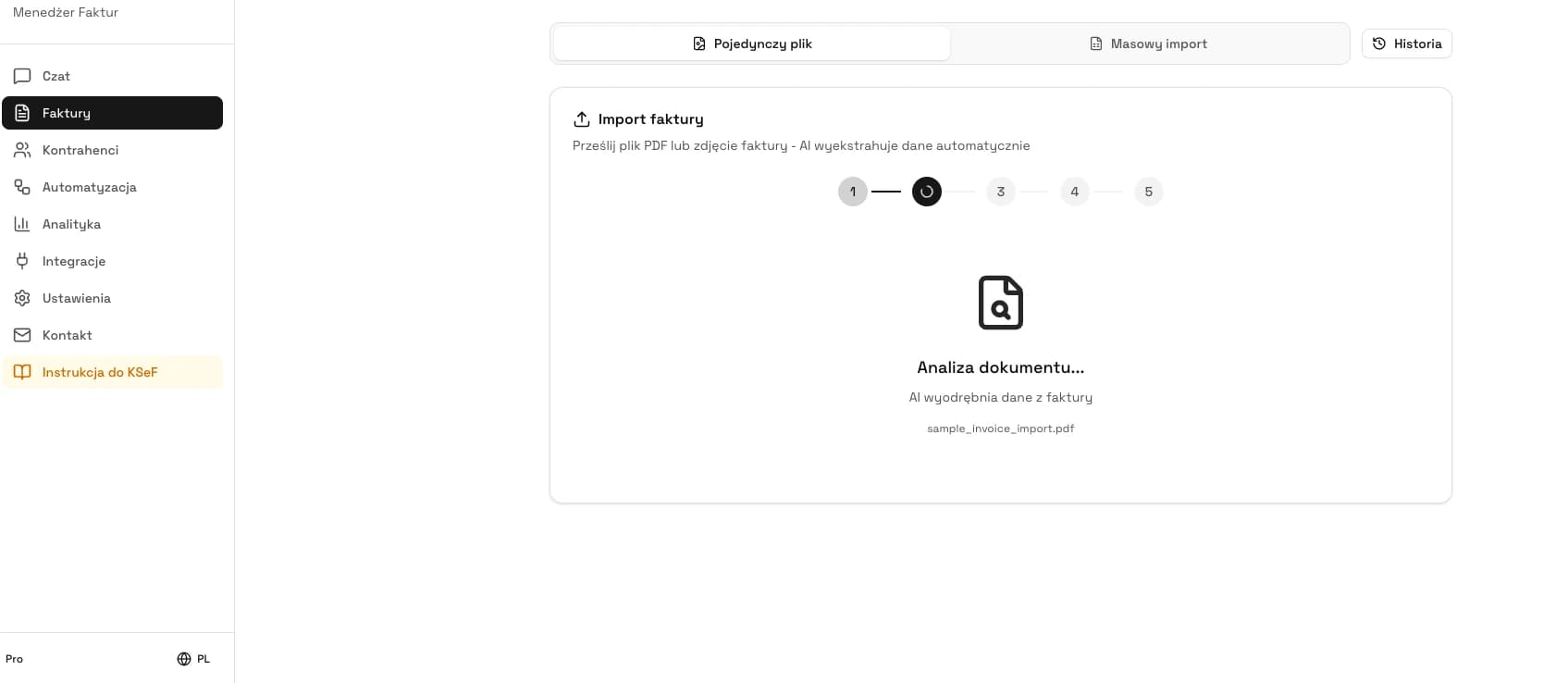
In KSeFGPT, this process can be based on document imports and the invoice list. The screenshot below shows PDF data import, a typical case for a freelancer who receives documents from multiple sources and wants to reduce manual typing.
Once the monthly rhythm is clear, the remaining question is whether the official MF tool is enough or whether a private application is useful for organising the process.
| Moment | Action | What to save | What to send to the accountant |
|---|---|---|---|
| Start of week | Check new cost invoices in KSeF. | Counterparty, amount, date and status. | Only accepted documents or a list of questions. |
| After a business purchase | Mark the cost and add a short description. | Purpose, project and responsible person. | A description that allows review without guessing. |
| Month-end | Issue sales invoices and download UPO. | Invoice number, KSeF number, UPO and acceptance status. | Sales package with confirmations. |
| Before month close | Clarify disputed documents. | Decision: book, wait or request correction. | List of ready and paused documents. |
| After sending to accounting | Record what was handed over. | Date, document scope and open questions. | One package instead of scattered emails. |
Is the Taxpayer Application enough
Aplikacja Podatnika KSeF 2.0 is the free tool from the Polish Ministry of Finance. For a freelancer with a few simple invoices it may be enough, especially if the priority is manual issuing, invoice receipt and UPO download.
KSeFGPT makes sense when the problem is not simply entering KSeF, but keeping documents in order. Examples include PDF or CSV import, more costs, statuses, UPO control, fast invoice search, data export and working with an accountant without retyping.
A fair boundary: if you have one sales invoice, two costs and the accountant handles the whole process, the MF tool may be enough. If you start having a dozen documents, a foreign client, more costs or you want all invoices in one organised view, a private app can save time.
KSeFGPT is not an official MF tool, accounting office or bookkeeping program. It is a tool for working with KSeF invoices, document imports, data checks and preparing information for accounting.
| Situation | When the MF tool may be enough | When KSeFGPT is worth considering |
|---|---|---|
| A few invoices per month | When the process is manual and simple. | When you want statuses, an archive and fast data handover. |
| Many costs | When the accountant downloads and describes everything with you continuously. | When you want to control incoming invoices before sending them to accounting. |
| PDF, CSV and XML from different sources | When there are few documents and they can be entered manually. | When imports and data organisation save real time. |
| Foreign client | When a standard visualisation and simple communication are enough. | When you need readable document versions and order in source data. |
| Accounting office collaboration | When the office gives a clear process and export format. | When you want to send complete data without chaotic emails. |
Set up a simple KSeF process for your sole proprietorship
KSeFGPT helps organise KSeF invoices, import document data, control UPO and send accounting a complete information package without a heavy ERP.
Check KSeFGPTChecklist before the first KSeF month
Before the first full month in KSeF, do not start by choosing the most expensive tool. Start with who has access, who issues sales invoices, who receives costs and what exactly goes to the accountant.
Access: check whether you can log in to the tool and work in the context of the correct NIP.
Permissions: decide whether the accountant, employee or collaborator has the needed access, and if not, how documents will be handed over.
Authentication: choose a safe way to work with KSeF, and treat tokens or certificates like credentials that should not be shared casually.
Sales: prepare the invoice data template, numbering, sending method, UPO download and archive of KSeF numbers.
Costs: define days for checking incoming invoices, document statuses and purchase descriptions.
Foreign clients: prepare rules for sending a readable visualisation to the counterparty and a list of cases that require an accountant's review.
Archive: decide where you keep XML, PDF, UPO, KSeF number and the history of documents sent to accounting.
Once the starting plan is ready, the final step is avoiding repeatable mistakes.
| Area | Minimum decision before start |
|---|---|
| KSeF access | Who logs in and in which tool. |
| Accountant | What they receive, when they receive it and in what format. |
| Sales invoices | Who issues them, who checks UPO and where the KSeF number is saved. |
| Cost invoices | How often they are checked and who accepts the cost. |
| Disputed documents | Who contacts the seller and who decides to pause accounting. |
Common freelancer mistakes in KSeF
The first mistake is focusing only on your own sales invoices. A freelancer can quickly learn sending while missing cost invoices waiting in KSeF.
The second mistake is confusing a PDF with a structured invoice. A PDF is readable, but the formal KSeF process is based on FA(3) XML, KSeF number and UPO.
The third mistake is missing UPO in the archive. An invoice that was prepared or technically sent should not be treated like a document accepted by KSeF and confirmed by UPO.
The fourth mistake is sending the accountant only a file without context. Costs often need a purchase description, project, approval status and information on whether the document is disputed.
The fifth mistake is treating the PLN 10,000 preference too broadly. It is a transitional deferral for specific invoices and a specific period, not a general permission to ignore KSeF.
| Mistake | Better process |
|---|---|
| Waiting only for a supplier PDF | Regularly check incoming invoices in KSeF. |
| No UPO after a sale | After sending, save the KSeF number and UPO in the archive. |
| The accountant receives a chaotic file pack | Send documents with status, description and complete identifiers. |
| Every cost is immediately ready for accounting | First confirm the purchase and mark disputed documents. |
| Treating the PLN 10,000 limit as a permanent exemption | Call it a transitional preference and monitor the moment it is exceeded. |
Expert perspective
The biggest risk for a sole proprietor is not that the owner will click the wrong button in KSeF. The risk is lack of process: a sales invoice is prepared but there is no UPO; a cost appears in KSeF but nobody checks it; the accountant receives a file but not its status or description.
For a freelancer, a reasonable process should be short, repeatable and possible without an admin department. A few fixed rules are enough: when you check incoming invoices, when you issue sales invoices, what you save after UPO and what data package goes to accounting.
It is also worth being careful with shortcuts such as PDF is enough or the accountant will see everything. KSeF organises the central invoice flow, but it does not replace the decision whether a cost was real, ordered and correctly described.
That is why this article deliberately does not go into PIT, KPiR, lump-sum tax or the tax timing of costs. Those topics require separate analysis. Here the priority is a safe invoice, data and responsibility workflow.
Frequently asked questions
Does a freelancer have to use KSeF?
Yes, if the freelancer runs a Polish business and issues invoices covered by mandatory KSeF. For a typical B2B sole proprietorship, this means preparing sales invoices in KSeF and regularly checking incoming cost invoices issued to the business NIP.
When must a Polish sole proprietor issue invoices in KSeF?
For most sole proprietors, mandatory issuing in KSeF starts on April 1, 2026. Until the end of 2026 there is a transitional preference for the smallest taxpayers if monthly gross sales documented by invoices covered by KSeF do not exceed PLN 10,000.
Does a sole proprietor need to receive cost invoices in KSeF from February 1, 2026?
Yes. Receiving invoices through KSeF is mandatory from February 1, 2026. Even if a freelancer issues their own sales invoices later, they should be able to check incoming invoices in KSeF.
What does the PLN 10,000 gross limit mean for a freelancer?
It is a transitional preference until the end of 2026, not a permanent exemption from KSeF. If the limit is exceeded in a given month, the invoice that exceeds it and later invoices should be issued in KSeF.
Does a B2B software developer have to issue invoices through KSeF?
As a rule, yes, if they run a Polish sole proprietorship and issue B2B invoices covered by mandatory KSeF. In practice, they should check the start date, the PLN 10,000 transitional preference and whether the invoice is domestic B2B, consumer-facing or foreign.
Is a PDF from a supplier enough for accounting?
A PDF is a convenient visualisation, but for a structured invoice the data source is the FA(3) XML, while the KSeF number and UPO confirm acceptance. An accountant may need a readable PDF, but the process should not rely only on PDF files.
What should a freelancer send to the accountant after issuing an invoice in KSeF?
The safest package is the invoice number, KSeF number, UPO for the freelancer's own sales invoice, XML or export from the tool, a readable PDF visualisation and information on whether the document was accepted, rejected or needs clarification.
Is the official Taxpayer Application enough for a sole proprietor?
It can be enough for a very simple process, a small number of invoices and manual work. With more costs, PDF or CSV imports, accountant collaboration and status checks, a tool that organises documents and data is often useful.
Is KSeFGPT accounting software?
No. KSeFGPT is a private application for working with KSeF invoices, document imports, data checks, UPO and information sent to accounting. It does not replace an accounting office, bookkeeping software or a tax adviser.
What should I do with an invoice for a foreign client?
Separate issuing the invoice under the correct rules from communicating it to the client. If the invoice is issued in KSeF, the foreign recipient can receive an agreed visualisation, for example a PDF in a language they understand.
Recommendation
If you want to go further, start with four materials. KSeF for small businesses organises the wider software and small-company process. Sending invoices to KSeF explains the technical sales-invoice flow. Receiving invoices through KSeF helps set up costs and incoming invoices. KSeF invoice in English, German and Ukrainian explains how to give a counterparty a readable visualisation without creating a second invoice.
Set up a simple KSeF process for your sole proprietorship
KSeFGPT helps organise KSeF invoices, import document data, control UPO and send accounting a complete information package without a heavy ERP.
Check KSeFGPTSources
This article was prepared on the basis of official materials from the Polish Ministry of Finance and KSeF, verified on June 22, 2026.
- Zakres obowiązkowego KSeF
Polish Ministry of Finance · accessed: June 22, 2026
Official explanation of the scope of mandatory KSeF and the dates for the largest and remaining taxpayers.
- Od kiedy trzeba wystawiać faktury w KSeF?
Polish Ministry of Finance · accessed: June 22, 2026
MF material on the staged introduction of mandatory issuing in KSeF and the facilitation for sales up to PLN 10,000 gross per month.
- Poniżej 10 000 zł
Polish Ministry of Finance · accessed: June 22, 2026
Official explanation of the transitional preference for the smallest taxpayers and the consequences of exceeding the limit.
- JDG i MŚP
Polish Ministry of Finance · accessed: June 22, 2026
MF page for sole proprietors and small businesses preparing for KSeF.
- Wystawianie i otrzymywanie faktur
Polish Ministry of Finance · accessed: June 22, 2026
Explanations on receiving invoices in KSeF, B2C, VAT deduction and invoices issued outside the system.
- Faktura ustrukturyzowana i struktura logiczna FA
Polish Ministry of Finance · accessed: June 22, 2026
Official description of the structured invoice, XML format and FA(3) logical structure.
- Numer KSeF i zbiorczy identyfikator
Polish Ministry of Finance · accessed: June 22, 2026
Information on the KSeF number as the identifier of an invoice accepted by the system.
- Co zawiera UPO
Polish Ministry of Finance · accessed: June 22, 2026
MF material showing what data the official receipt confirmation contains for an invoice accepted in KSeF.
- Aplikacja Podatnika KSeF 2.0
Polish Ministry of Finance · accessed: June 22, 2026
Description of the free MF tool for issuing, receiving and reviewing KSeF 2.0 compliant invoices.
- Certyfikaty KSeF
Polish Ministry of Finance · accessed: June 22, 2026
Explanations of KSeF certificates, NIP and PESEL identifiers and permissions in the system.
Expert reviewed: Bogdan Mazurek
Tax adviser · June 22, 2026
The article was reviewed for KSeF 2.0 dates, the PLN 10,000 transitional preference, invoice receipt obligations, the distinction between FA(3) XML, PDF, KSeF number and UPO, and the cautious description of a private tool in a freelancer or sole proprietor workflow.