PDF to XML converters for KSeF 2026 compared - which one should you choose?
Not every PDF to XML converter is suitable for KSeF. Check when to choose KSeFGPT, the Taxpayer Application, an ERP, ksefpdf.pl or another tool, and why regular XML from a PDF is not enough.
Article summary
The best PDF to XML KSeF converter depends on the scenario. You need one tool for a one-off PDF invoice conversion, another for manually issuing documents in the Ministry of Finance system, and another for bulk invoice handling in an accounting office or a company with an ERP.
KSeF does not work with just any XML file. A structured invoice must comply with the FA(3) logical structure, used for invoices issued in KSeF from February 1, 2026. A regular PDF to XML converter may transcribe text from the document, but it does not necessarily map NIPs, dates, line items, VAT rates and totals correctly into the structure required by KSeF.
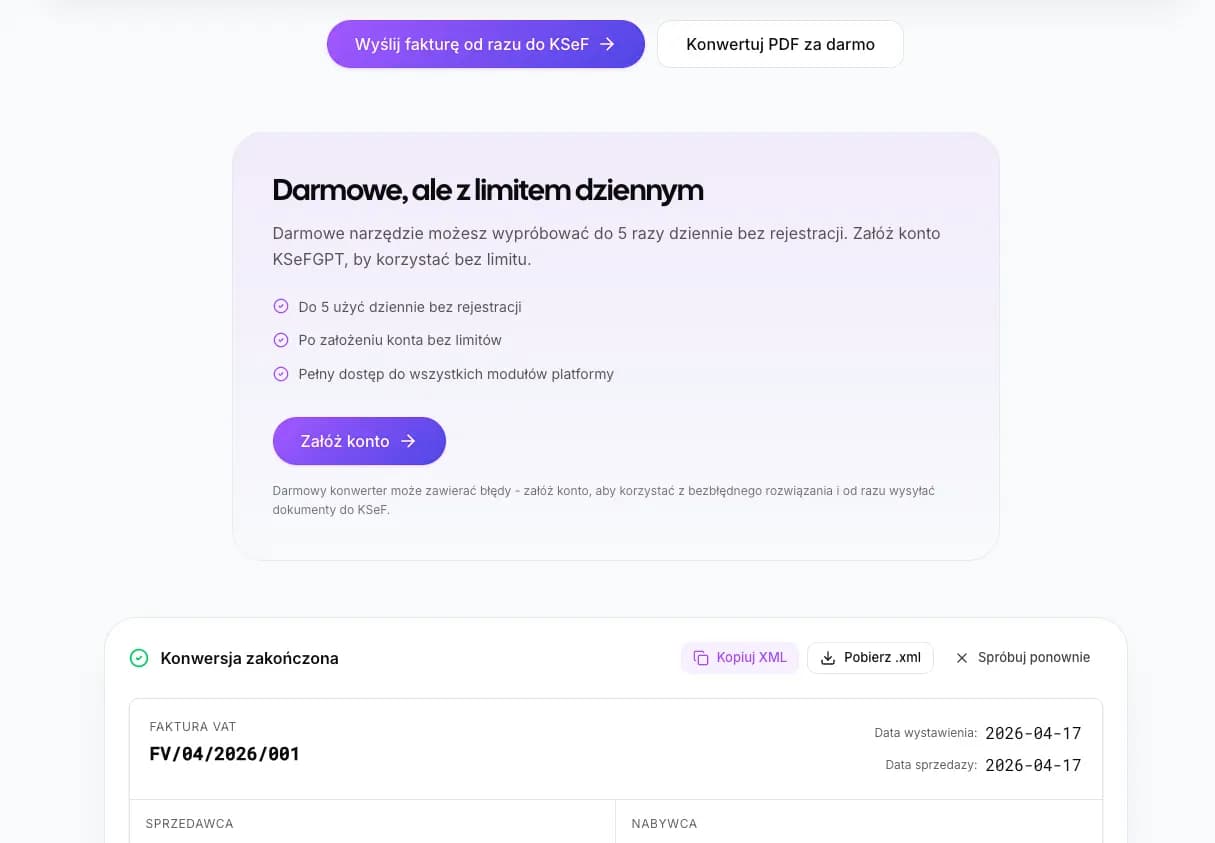
KSeFGPT is worth choosing when you want to quickly test PDF to FA(3) XML conversion and see the result in an invoice preview. The public tool has a usage limit and requires an email address and consent before the result can be downloaded. The free converter does not submit the invoice to KSeF; submission, operation history and broader automation are part of the process after creating an account.
Short answer: which PDF to XML KSeF converter should you choose?
If you have a single PDF and want to quickly obtain FA(3) XML, start with a tool designed for KSeF, such as KSeFGPT. If you want to manually issue invoices from scratch, the KSeF 2.0 Taxpayer Application may be a better choice. If invoices are already created in accounting software, you usually do not need a PDF converter, but an up-to-date KSeF integration.
| Scenario | Best choice | Why |
|---|---|---|
| Single PDF invoice | KSeFGPT or another PDF to FA(3) XML tool | It quickly converts a PDF into an invoice structure and lets you check the data before downloading the XML. |
| A few test documents | Public KSeFGPT converter | Good for checking what conversion looks like and which fields need manual verification. |
| Manual invoice issuing from scratch | KSeF 2.0 Taxpayer Application | It is the official Ministry of Finance tool for issuing, receiving and viewing KSeF invoices. |
| Invoices created in an ERP or accounting system | KSeF module in the ERP | The system has the invoice source data, so it should generate XML without intermediate conversion from PDF. |
| Accounting office or higher volume | Plan matched to PDF volume and company count | As of September 19, 2026, Medium includes 20 PDF imports per month and 1 company for PLN 99 net/month; Pro includes 100 PDF imports and 2 companies for PLN 499 net/month. Higher volume or more companies requires an individually agreed Enterprise offer. Spreadsheet import allowances are separate and do not increase the PDF allowance. |
| Only extracting text from PDF | Generic PDF to XML converter | It may help with auxiliary data extraction, but should not be treated as an FA(3) XML generator. |
Test PDF to FA(3) XML conversion
Upload a PDF invoice, check the recognized data and download XML. Remember that conversion is not yet submission to KSeF.
Open the PDF to XML converterWhy regular PDF to XML is not enough for KSeF
A PDF is a document visualization. It may look like an invoice, contain all required data and be suitable for sending by email, but it is not a structured invoice within the meaning of KSeF.
KSeF requires an XML file compliant with the structured invoice logical structure. From February 1, 2026, the applicable template is FA(3). This means that it is not only the text read from the PDF that matters, but also correct fields, date formats, taxpayer identifiers, VAT dictionaries, totals and relationships between XML elements.
Generic PDF to XML tools usually create technical XML describing the document layout or extracted text. Such a file may be valid XML in IT terms, but still not be an FA(3) invoice. In practice, it may fail validation or require manual rewriting into the correct structure.
If you want to organize the basics first, also read the guide Can a PDF be sent to KSeF and the technical overview XML and the FA(3) format in KSeF.
How to compare PDF to XML KSeF converters
Comparing converters should not come down to asking which one is cheapest. In KSeF, it matters more whether the tool understands the FA(3) structure, lets you verify the data and clearly explains where conversion ends and submission to the system begins.
The most important criteria are: FA(3) support, invoice preview before downloading XML, ability to correct fields, file validation, usage limit, email or account requirement, information about file retention, transparent pricing, support for higher volume and whether the tool offers actual submission to KSeF after authentication.
It is also worth checking whether the provider mixes concepts. The phrase "send to KSeF" should mean a specific process: authentication, invoice submission through an API or application, processing status and the ability to download the UPO. Downloading XML from a converter alone does not mean the invoice has been issued in KSeF.
| Criterion | Why it matters |
|---|---|
| FA(3) | Without compliance with the FA(3) structure, the file will not meet KSeF requirements. |
| Data preview and correction | OCR and AI may misread NIP digits, dates, line items or amounts. |
| Validation | Helps catch errors before import or submission. |
| Submission to KSeF | Should be described separately from PDF to XML conversion. |
| Operation history | Important for higher volume and teamwork. |
| Limits and pricing | Help assess whether the tool is suitable for a daily process. |
| File retention | Invoices contain counterparty data, amounts and tax identifiers. |
Tool comparison in practice
The table below is not a laboratory ranking of OCR accuracy. It is a practical selection matrix by tool type and usage scenario. Data about commercial offers should be checked on the publication day, because limits, pricing and features may change.
The biggest difference is the purpose of the tool. KSeFGPT and similar KSeF-focused solutions concentrate on converting a PDF invoice into FA(3) XML. The Taxpayer Application is used for working in KSeF, but should not be described as an automatic PDF converter. An ERP works best when the invoice is created in the source system. Generic PDF to XML converters do not solve the FA(3) problem.
| Tool or type | What it actually does | Best use case | Limitation |
|---|---|---|---|
| KSeFGPT - public converter | Converts PDF to FA(3) XML, shows the result and lets you download XML. | Single documents, tests, quick PDF conversion. | Has a usage limit; email and consent are required before downloading the result; the free tool does not submit the invoice to KSeF. |
| KSeFGPT - account | Extends the process with submission, history, AI and support for multiple operations. | Companies and accounting offices that need more than just an XML file. | As of September 19, 2026, Medium includes 20 PDF imports per month and 1 company for PLN 99 net/month; Pro includes 100 PDF imports and 2 companies for PLN 499 net/month. Higher volume or more companies requires an individually agreed Enterprise offer. Spreadsheet import allowances are separate and do not increase the PDF allowance. |
| ksefpdf.pl | Declares PDF to FA(3) XML conversion and commercial conversion packages. | Only for cautious testing after accepting legal and data-processing risks. | The data controller is not clearly identified; invoice content is sent to OpenAI; the terms place verification and responsibility for the result on the user. |
| KSeF 2.0 Taxpayer Application | Official Ministry of Finance tool for issuing, receiving and viewing invoices. | Manual invoice issuing and work without commercial software. | It is not a typical automatic PDF to XML converter. |
| ERP or accounting software | Generates XML from invoice data stored in the system and may integrate with KSeF. | Companies that issue invoices in one accounting system. | Does not always solve the problem of external PDFs from counterparties. |
| Generic PDF to XML converter | Converts PDF into generic XML or extracts text from the document. | Auxiliary data extraction, technical work outside KSeF. | Does not automatically create a correct FA(3) invoice. |
Why ksefpdf.pl requires particular caution
ksefpdf.pl looks like a tool created for exactly the same problem: rewriting a PDF invoice into FA(3) XML. That is not enough to treat it as a low-risk choice for company invoices. With accounting documents, conversion convenience is not the only issue. It also matters who formally takes responsibility for the data, where the invoice content goes and who is responsible for the result.
The most serious issue concerns identification of the data controller. The privacy policy states that the controller is the "owner of the KSeF Converter service", but does not provide a company name, the full name of a business owner or registry details. For invoices containing NIPs, addresses, amounts and counterparty data, this is a material trust gap.
The second issue is data flow to external AI. The privacy policy and terms indicate that for PDF to XML, text extracted from the invoice, including invoice data, is sent to the OpenAI API. The provider declares that it does not send the PDF files or images themselves, but from a business confidentiality perspective, the key issue is the document content, not only the file format.
The third issue is the responsibility structure. The terms state that the service does not guarantee conversion correctness for all formats, results must always be verified, and the provider is not responsible for the consequences of incorrectly generated files. This means the user carries the tax and operational risk, even if an error originated in automated extraction.
| Risk in ksefpdf.pl | Why it reduces trust |
|---|---|
| Data controller described as the "owner of the service" | The user does not directly see which company or person is responsible for processing invoice data. |
| Invoice content sent to OpenAI | NIPs, amounts, dates and counterparty data may be transferred to an external AI subprocessor. |
| Hosting and subprocessors outside Poland | The policy references, among others, Railway, OpenAI, Stripe and Resend, so data or metadata may be processed outside the company's local environment. |
| No guarantee of conversion correctness | The tool may prepare XML, but the user remains responsible for detecting errors before formal use. |
| Liability exclusions in the terms | The risk of invoice rejection, incorrect data and financial loss remains in practice with the user. |
| Declared file retention, but without strong entity identification | A declaration of deletion after 30 minutes does not solve the issue by itself: the user also needs to know who is legally responsible for it. |
When to choose KSeFGPT
KSeFGPT is a good choice when you have an invoice in PDF and want to quickly receive FA(3) XML, without manually retyping all fields into an application. The public converter is especially useful for single documents, process tests and situations where you need to check whether PDF data can be sensibly mapped to the KSeF structure.
However, two levels must be clearly separated. The public PDF to XML tool is used for conversion and downloading the result. It is not standalone invoice submission to KSeF and it does not assign a KSeF number or UPO. Submission requires a separate authentication and KSeF communication process.
As of September 19, 2026, Medium includes 20 PDF imports per month and 1 company for PLN 99 net/month; Pro includes 100 PDF imports and 2 companies for PLN 499 net/month. Higher volume or more companies requires an individually agreed Enterprise offer. Spreadsheet import allowances are separate and do not increase the PDF allowance. Check current terms on the KSeFGPT pricing page.
What happens after uploading a PDF to KSeFGPT
The current public KSeFGPT process is simple: the user uploads a PDF file, the tool creates a processing job, and the frontend periodically queries the result endpoint. The input file is limited to PDF and has a 10 MB client-side limit.
After processing, the user sees an invoice preview and raw XML. Before revealing the full result, the public process uses a lead form: a valid email address and consent are required, while phone number is optional.
This process should not be described as a guarantee of correctness. The converter helps turn a PDF into FA(3) XML, but the user should still check NIPs, dates, amounts, VAT rates, line items and totals. For scanned invoices, unusual PDF layouts or poor document quality, the risk of incorrect reading is higher.
Have a ready PDF? Check the result on your own document
The converter will show an invoice preview and XML. Before submitting to KSeF, verify the data and run validation.
Test PDF to XMLWhen the Taxpayer Application or ERP will be better
The KSeF 2.0 Taxpayer Application will be a better choice if you do not have a PDF to process, but want to manually issue an invoice in the official environment. It is the free Ministry of Finance tool for issuing, receiving and viewing invoices compliant with KSeF 2.0.
An ERP or accounting system will be better if sales invoices are already created in the system. In that case, the software has the source data and can generate FA(3) XML without conversion from PDF. This is usually a cleaner process than creating a PDF and then trying to read it back into an XML structure.
A PDF to XML converter is most needed where PDF is the input document: for documents from counterparties, archived invoices, scans or processes where the company does not have access to source data in the invoicing system.
Red flags when choosing a PDF to XML KSeF converter
The first red flag is no clear FA(3) declaration. If a tool only says "PDF to XML" but does not explain that it generates the structured invoice format for KSeF, treat it as a generic data extractor.
The second red flag is a promise that conversion automatically means submission to KSeF or guaranteed acceptance. The correct message should be more cautious: the tool generates XML, and the result must be checked and submitted through the correct channel.
The third red flag is no data preview. Without a preview, it is hard to catch a mistaken NIP, incorrect date, misread VAT rate or shifted invoice line item.
The fourth red flag is no full identification of the data controller. Invoices contain counterparty data and transaction amounts, so a statement that the controller is the "owner of the service", without naming the entity, does not give the user sufficient legal context.
The fifth red flag is sending invoice content to external AI services without a very clear business and legal justification. If a provider processes NIPs, amounts, dates and counterparty data outside its own infrastructure, the user should know exactly who the controller is, who the subprocessors are and what the data transfer terms are.
The sixth red flag is no information about limits, pricing and data processing. The tool should clearly communicate what happens to the PDF file, generated XML, account data, logs and whether the document content is sent to external AI services.
| Red flag | Risk |
|---|---|
| No information about FA(3) | You may receive arbitrary XML, not a KSeF invoice. |
| The phrase "send to KSeF" without an authentication description | It is unclear whether the tool actually supports the KSeF process. |
| No data preview | You cannot detect OCR errors before downloading the XML. |
| No validation or validation instructions | Errors will only appear during import or submission. |
| No data controller name | You do not know who specifically is responsible for processing invoice data. |
| Invoice content sent to external AI | Commercial and tax data leaves the direct context of the tool. |
| Terms exclude liability for an incorrect result | Tax and operational risk remains with the user. |
| Unclear file processing policy | You do not know how long the provider stores invoices. |
| Unclear limits | The tool may not be suitable for daily work. |
How to safely move from conversion to submission
After downloading XML, do not automatically assume the document is ready to submit. First check the invoice preview, then verify the XML with a validator, and only then import it into a tool that actually supports submission to KSeF.
The minimum post-conversion checklist includes: seller and buyer NIP, issue date, invoice number, currency, VAT rates, net and gross totals, number of line items and consistency of descriptions with the source document. For foreign-currency invoices, also check the exchange rate and fields required for settlement.
If the document is tax-sensitive, has an unusual structure or a high amount, do not rely only on the automated result. Conversion shortens the work, but it does not remove the need to check data before submitting the invoice to KSeF.
If you want to understand what happens after the file is generated, read the guide Free PDF to XML KSeF converter and the article about XML validation and processing in KSeF.
Verify XML before submission
After PDF conversion, run the KSeF XML validator and check whether the file passes structure and basic data checks.
Open the XML validatorFrequently asked questions
Can a PDF be sent directly to KSeF?
Not as a structured invoice. KSeF requires an invoice in XML format compliant with the FA(3) logical structure. A PDF can be input material for conversion or a document visualization, but it does not replace FA(3) XML.
Is any XML from a PDF converter enough for KSeF?
No. The XML must follow the FA(3) structured invoice format. A generic XML file describing the text or layout of a PDF may be valid XML technically, but it does not necessarily meet KSeF requirements.
Does KSeFGPT require an account for PDF to XML conversion?
The public converter does not require a full account, but before downloading the result it requires an email address and consent. A full account is needed if you want history, submission to KSeF and broader automation.
Does the free KSeFGPT converter submit the invoice to KSeF?
No. The free converter is used to generate and download XML. Submission to KSeF is a separate step requiring authentication and an appropriate tool, such as a KSeFGPT account, the Taxpayer Application or accounting software with KSeF integration.
Does the conversion result need validation?
Yes. After conversion, it is worth checking the XML with a validator and manually comparing the key data with the PDF: NIPs, dates, invoice number, amounts, VAT rates and line items. A converter reduces manual work, but does not guarantee automatic acceptance by KSeF.
Is the KSeF 2.0 Taxpayer Application a PDF to XML converter?
Not in the usual sense. It is the official free Ministry of Finance tool for issuing, receiving and viewing KSeF invoices. It is a good choice for manual work in KSeF, but it should not be described as an automatic OCR tool for PDFs.
Is ksefpdf.pl a safe choice for company invoices?
It requires caution. The privacy policy identifies the data controller generally as the owner of the service, without a clear company or personal name, and during PDF to XML conversion the invoice text is sent to the OpenAI API. For invoices containing counterparty data, NIPs and amounts, these are material trust and data-processing risks.
What should an accounting office choose?
As of September 19, 2026, Medium includes 20 PDF imports per month and 1 company for PLN 99 net/month; Pro includes 100 PDF imports and 2 companies for PLN 499 net/month. Higher volume or more companies requires an individually agreed Enterprise offer. Spreadsheet import allowances are separate and do not increase the PDF allowance. Check current terms on the KSeFGPT pricing page.
Convert PDF to FA(3) XML and check the result
Use the public KSeFGPT converter for single documents or create an account if you need submission to KSeF, history and work with a higher invoice volume.
Go to the PDF to XML converterSources and materials
This article is based on official KSeF materials and locally verified behavior of public KSeFGPT tools. Data about commercial providers should be checked again on the publication day.
- Structured invoice and FA logical structure
Krajowy System e-Faktur / Ministry of Finance · accessed: June 10, 2026
Official explanation that a structured invoice has XML format compliant with the logical structure published in CRWDE.
- FA(3) logical structure
Krajowy System e-Faktur / Ministry of Finance · accessed: June 10, 2026
Official information about the FA(3) structure, its publication and its use from February 1, 2026.
- Scope of mandatory KSeF
Krajowy System e-Faktur / Ministry of Finance · accessed: June 10, 2026
Official dates for the phased implementation of mandatory KSeF and the entities covered by the obligation.
- KSeF 2.0 Taxpayer Application
Krajowy System e-Faktur / Ministry of Finance · accessed: June 10, 2026
Description of the official free Ministry of Finance tool for working with KSeF invoices.
- PDF to XML KSeF converter
KSeFGPT · accessed: June 10, 2026
Public KSeFGPT tool page used to verify the conversion scope, limit and positioning of the tool.
Expert reviewed: Bogdan Mazurek
Tax advisor · June 10, 2026
The content was reviewed for current KSeF 2.0 rules, the FA(3) structure requirement and the distinction between file conversion and issuing an invoice in KSeF. The tool comparison describes selection scenarios and provider declarations; it does not replace a technical test of each solution.