How to add a contact person to a counterparty in CRM
Save the name and contact details of a person at the counterparty.
- Module
- CRM / Counterparties
- Reading time
- 3 min
- Difficulty
- Easy
You could do this with your eyes closed :)
- Published
- September 7, 2026
- Author
- Rafał Zeidler
- Format
- Written guide and video
Written procedure
What you will do
Add a person to an existing company’s contacts. Save their full name, job title, email and phone, then find these details on the same counterparty profile.
Requirements
Before you start
| Item | Requirement |
|---|---|
| Access | Owner of the selected company with CRM access. Verified as the owner. |
| Required details | An existing company profile and the person’s name. The form also requires an email or phone number. |
| Starting point | After signing in, select the correct company and open CRM > Counterparties. |
| Time | 2 min |
| Effect | The person will be linked to the selected company and displayed under Contact people. |
Process recording
0:21Save the name and contact details of a person at the counterparty.
Open the company contacts
Select CRM > Counterparties. Open the correct company name, such as Atlas Demo Sp. z o.o.
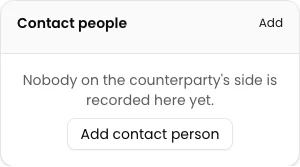
Find Contact people on the profile and select Add. The New contact person dialog opens.
Enter the person’s details
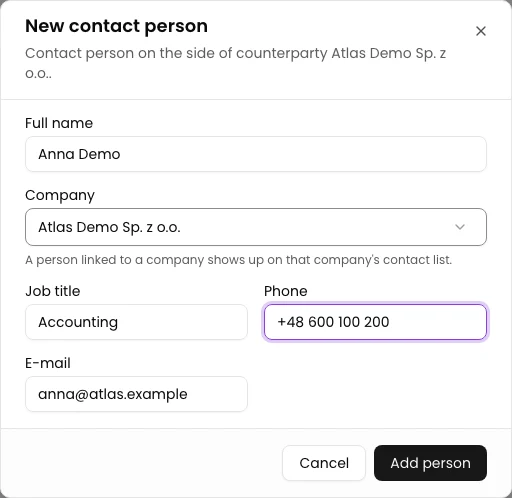
Enter Anna Demo in Full name. Check that Company identifies the correct counterparty.
Enter Job title: Accounting, E-mail: anna@atlas.example and Phone: +48 600 100 200. Use the same fields for your own details. One contact channel is required; the example fills both.
Save and check the contact
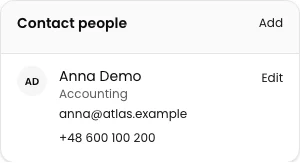
Select Add person. The dialog closes and the person appears under Contact people.
Reload the profile, find Anna Demo and compare the job title, email and phone with the values you entered.
Final state
Check the result
The Atlas Demo Sp. z o.o. profile shows Anna Demo, Accounting, anna@atlas.example and +48 600 100 200 under Contact people after reloading.
Diagnostics
If something does not work
| Symptom | Cause | What to do |
|---|---|---|
| The form asks for an email or phone | No contact channel was provided. | Enter E-mail or Phone and select Add person again. |
What next
Choose the next operation in the CRM instructions.
The contact is on the counterparty profile
The Atlas Demo Sp. z o.o. profile shows Anna Demo, Accounting, anna@atlas.example and +48 600 100 200 under Contact people after reloading.
Open CRM