How to Issue a Final Invoice After an Advance in KSeF
Learn when a final invoice is needed after an advance, how to deduct earlier payments and avoid settling the same sale twice.

Article Summary
A final invoice after an advance in KSeF should not be treated as another ordinary sales invoice. If earlier advance invoices do not cover the full payment, the final document settles the entire transaction and reduces the remaining amount by earlier advances.
In the FA(3) structure, remember the simple rule: an advance invoice is type ZAL, and a settlement invoice after advances is usually type ROZ. The rest of this article uses the business names: advance invoice, settlement invoice and final invoice.
The main risk is double settlement of the same sale or no link between the final invoice and earlier advance invoices. Before submission, collect invoice numbers, KSeF numbers, amounts, VAT, dates and UPO confirmations.
When a final invoice after an advance is needed
A final invoice after an advance is used when the customer paid part of the price before performance and the remaining amount must be settled after the service or delivery. The advance invoice alone does not show the full final settlement.
If the customer paid 30% before delivery and 70% after delivery, the first payment may be documented with an advance invoice, and after the transaction is completed you may need a final invoice. If there were several advances, the final document should refer to the full set of earlier invoices.
If the advance covered the full payment, do not mechanically issue another invoice just because the project ended. That case should be checked with accounting, because an additional document may duplicate the sale instead of organizing it.
| Scenario | Typical document | Pre-submission check |
|---|---|---|
| 30% advance, remainder after service | Advance invoice after payment and final invoice after completion. | Whether the final invoice reduces the remaining amount by the advance. |
| Several advances before delivery | Several advance invoices and one final invoice. | Whether the final document includes all earlier advance invoices. |
| 100% advance | Do not automatically assume an extra final invoice. | Whether accounting confirms that no final document is needed. |
| Scope changed after an advance | Final invoice or correction, depending on the case. | Whether the advance invoice must be corrected first. |
How a settlement invoice differs from an advance invoice
An advance invoice and a settlement invoice describe two different moments of the same transaction. The advance invoice documents payment received before performance. The settlement invoice appears later, when the transaction is performed and the full value of the order or contract must be settled.
In practice, the advance invoice answers how much the customer paid before the service. The settlement invoice answers what the full transaction value is, how much was already settled with earlier documents and what remains to be paid.
The broader distinction between invoice types is explained in Types of invoices in KSeF, and the advance process itself is described in Advance invoice in KSeF.
| Element | Advance invoice | Settlement invoice |
|---|---|---|
| Moment | Before performance, after receiving payment. | After performance or at final settlement. |
| Purpose | Document the advance. | Settle the whole transaction after advances. |
| Amounts | Amount of payment received. | Full transaction value and remaining amount due. |
| Links | Order or contract. | Earlier advance invoices, KSeF numbers and advance amounts. |
How to issue a settlement invoice in KSeFGPT
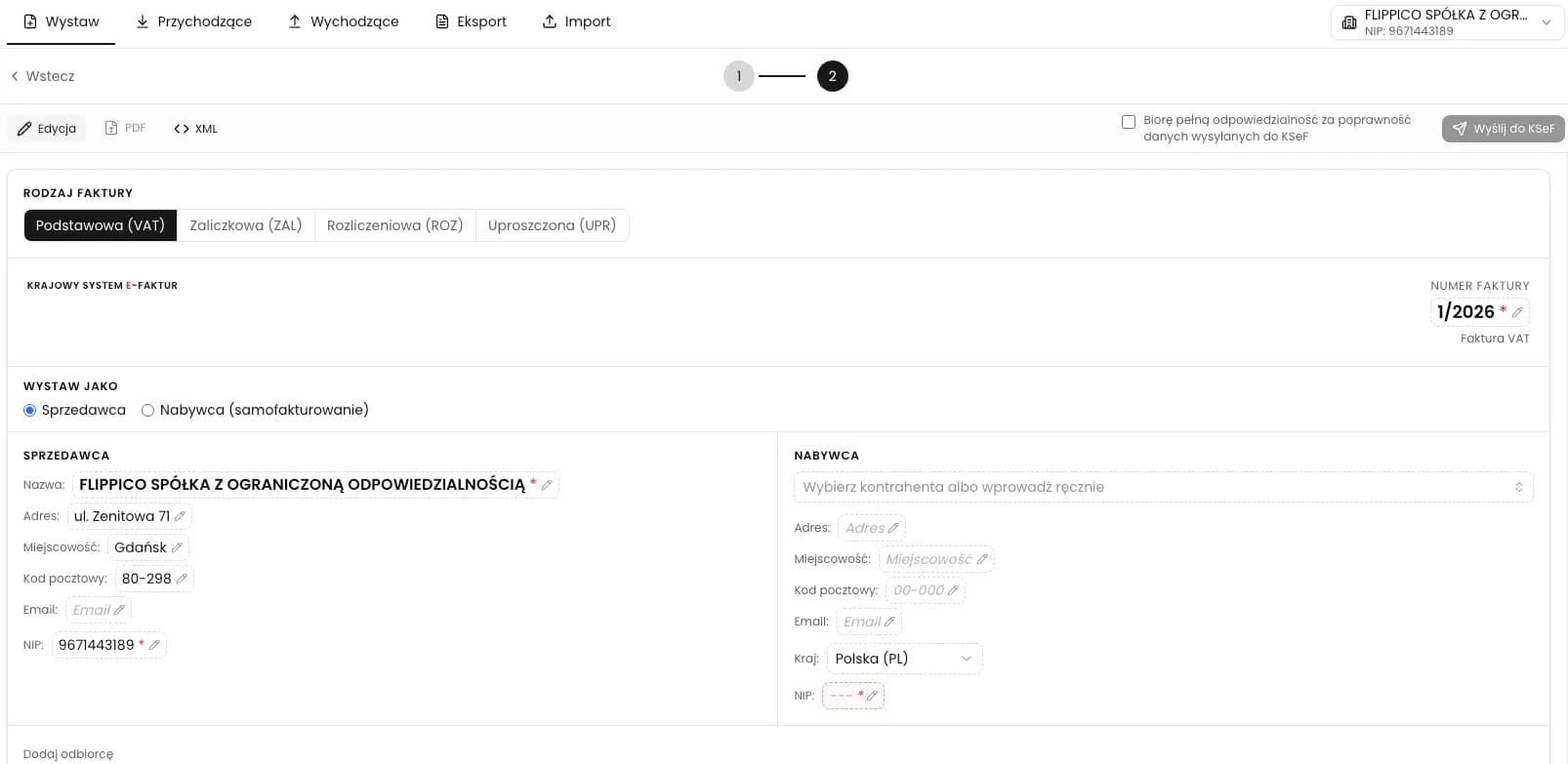
In KSeFGPT, issue the final invoice after an advance in Invoices > Issue > Invoice. In the Invoice type section, select Settlement (ROZ), not Basic (VAT) or Advance (ZAL).
Then complete the seller, buyer, invoice number, dates, line items and final values. In the settlement data, keep the link to earlier advance invoices: their numbers, KSeF numbers, amounts and dates.
Before submission, check the preview and XML. If the amounts do not match the advances, stop and explain the difference with accounting. After submission to KSeF, store the KSeF number, status and UPO for the settlement invoice.
Issue settlement invoices in one organized process
Prepare the settlement invoice, check XML, submit to KSeF and keep the KSeF number and UPO with the advance history.
Open KSeFGPTCommon mistakes with final invoices after advances
The first mistake is issuing an ordinary VAT invoice instead of a settlement invoice. It may look correct in a PDF view, but it does not clearly settle earlier advances.
The second mistake is deducting only one advance when the customer paid several times. The third is missing KSeF numbers or UPO in the internal register. The fourth is issuing a final document while the status of an advance invoice is still unclear.
If you discover an error after submission, do not rewrite the history manually and do not issue another ordinary invoice without analysis. Start by determining whether a correction is needed. The general process is described in Corrective invoice in KSeF.
Frequently Asked Questions
Is a final invoice required after every advance invoice?
No. A final or settlement invoice is needed when previous advance invoices did not settle the full transaction value. If the advance covered 100% of the value, do not automatically create an extra document without checking the specific case with accounting.
Which invoice type should be used for a final invoice after an advance?
Usually it is a settlement invoice, meaning the document that shows the full settlement after previous payments. Before submission, check that it includes all earlier advance invoices.
Should the final invoice include the KSeF number of the advance invoice?
In practice, you need to keep the link to previous advance invoices: internal numbers, dates, amounts, VAT, KSeF numbers and UPO. Without this, the final document is hard to reconcile with the transaction history.
What if the final invoice after an advance has an error?
If the settlement invoice has been accepted in KSeF, you do not fix it by editing the submitted document. You should assess whether a correction is needed and how it should connect to the earlier transaction history.
Can KSeFGPT issue a settlement invoice?
In the KSeFGPT invoices module, when issuing an invoice you can select Settlement, check the preview and XML, and then submit the document to KSeF after confirming responsibility for the data.
Handle advances and final invoices in KSeFGPT
Select the right invoice type, check XML, submit to KSeF and keep the KSeF number and UPO with the settlement history.
Open KSeFGPTSources and reference materials
This article is based on official KSeF materials and the FA(3) schema checked on July 6, 2026.
- Faktura ustrukturyzowana i struktura logiczna FA
KSeF · accessed: July 6, 2026
Opis faktury ustrukturyzowanej i struktury logicznej FA.
- Schemat FA(3) v1-0E
CIRF / Ministerstwo Finansów · accessed: July 6, 2026
Oficjalny schemat FA(3), w tym typy ZAL, ROZ, KOR_ZAL, KOR_ROZ i opisy pól rozliczeniowych.
- Ustawa o podatku od towarów i usług, tekst jednolity Dz.U. 2025 poz. 775
Dziennik Ustaw · accessed: July 6, 2026
Podstawa prawna faktur dokumentujących otrzymanie zapłaty przed czynnością oraz faktur po zaliczkach.
Expert reviewed: KSeFGPT Team
Invoice Automation and KSeF Experts · July 6, 2026
The article focuses on final invoice settlement after advances and separates FA(3) handling from transaction-specific tax advice.