How to send SAP invoices to KSeF through KSeFGPT
See how to submit sales invoices issued in SAP through PDF, CSV or Excel and how KSeFGPT supports the process.
Article summary
KSeFGPT does not currently integrate directly with SAP. Sales invoices issued in SAP can be exported to PDF, CSV, XLS or XLSX when the system configuration supports it. The file can then be imported into KSeFGPT, reviewed and submitted to KSeF.
KSeFGPT reads PDFs with OCR and AI, while tabular files go through column mapping and invoice-draft review. None of these source formats is sent directly to KSeF. After verification, KSeFGPT prepares the invoice data for submission in the required FA(3) XML structure.
This process concerns sales invoices issued by the company. A buyer does not resubmit purchase invoices to KSeF. Once the seller issues an invoice and KSeF accepts it, the buyer retrieves it from KSeF as an incoming invoice.
The planned integration is intended to retrieve issued invoices directly from SAP and, after KSeF accepts them, store the KSeF number against the correct SAP document. No release date or supported-version list has been announced.
Using SAP with KSeF before direct KSeFGPT integration
SAP and KSeF integration can describe two different tasks. The first is sending issued invoices to KSeF through a controlled process. The second is automating the exchange so that data leaves SAP and the acceptance result returns to the same document without manual copying.
The current KSeFGPT invoice import accepts sales-invoice data exported from SAP. Direct SAP integration remains on the product roadmap. File import does not automatically retrieve SAP documents or write the KSeF number back to SAP.
SAP also provides its own eDocument and DRC solutions. KSeFGPT is therefore not the only route to KSeF. The right choice depends on the SAP version, current architecture, invoice volume, required controls and where the team wants to manage errors.
Table of contents
Key conclusions
The table separates the currently available file-import process from the planned integration and SAP's native capabilities.
| Point | Details |
|---|---|
| KSeFGPT file import | PDF import with OCR and AI, plus CSV, XLS and XLSX import with column mapping, review and validation before submission. |
| No direct integration | KSeFGPT does not yet retrieve issued invoices directly from SAP or automatically write the KSeF number back to SAP. |
| Planned integration | The intended process retrieves an invoice from SAP, submits it through KSeFGPT and stores the KSeF number after acceptance. |
| SAP's own solutions | SAP documents KSeF support through eDocument and DRC, but the exact scope depends on product, version and updates. |
| When the number is stored | The KSeF number appears after invoice acceptance, not when the technical submission is first made. |
Does SAP support KSeF?
Yes, but there is no single answer for every SAP product and installation. Official SAP documentation describes Polish e-invoice processing for SAP ERP, SAP S/4HANA and SAP Business One. Depending on the environment, the process may use eDocument, eDocument Cockpit, Manage Electronic Documents or SAP Document and Reporting Compliance.
Product family: identify whether the company uses SAP ERP, S/4HANA, Business One or another variant. Update level: confirm the release, SP or FPS level and required SAP Notes. Process scope: verify whether the solution creates and submits the document, retrieves its status, stores the KSeF number and provides the Official Receipt, known in Poland as UPO.
SAP documentation also describes storing the KSeF number returned by the tax authority in the document data. This does not mean the function is active in every environment without configuration, updates or an implementation project.
| Option | What to verify | When to consider it |
|---|---|---|
| SAP eDocument or DRC | Product, version, updates, SAP Notes, supported documents and the return process. | When the company develops a native SAP landscape and wants to keep the process there. |
| KSeFGPT file import | Available PDF or CSV/XLS/XLSX export and completeness of the exported data. | When sales invoices issued in SAP need to be submitted without direct integration. |
| Planned KSeFGPT integration | Future supported-version list, connection method and return-data scope. | When KSeFGPT should remain the control, submission and monitoring layer for SAP invoices. |
How does KSeFGPT handle invoice exports from SAP?
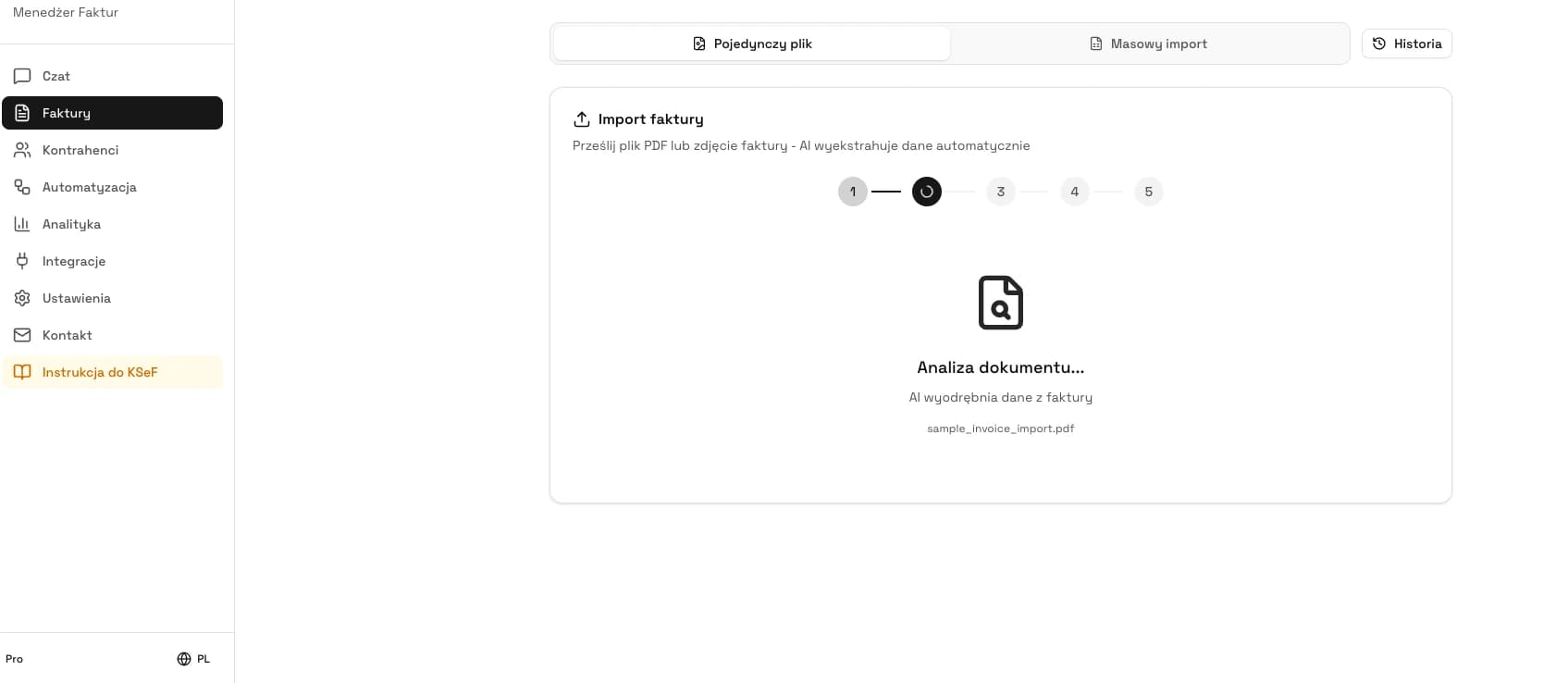
The current process starts with a sales invoice issued in SAP. If the invoice is exported as a single PDF, KSeFGPT reads its fields with OCR and AI. The user should then verify the buyer, tax ID, dates, line items, tax rates, amounts and bank account.
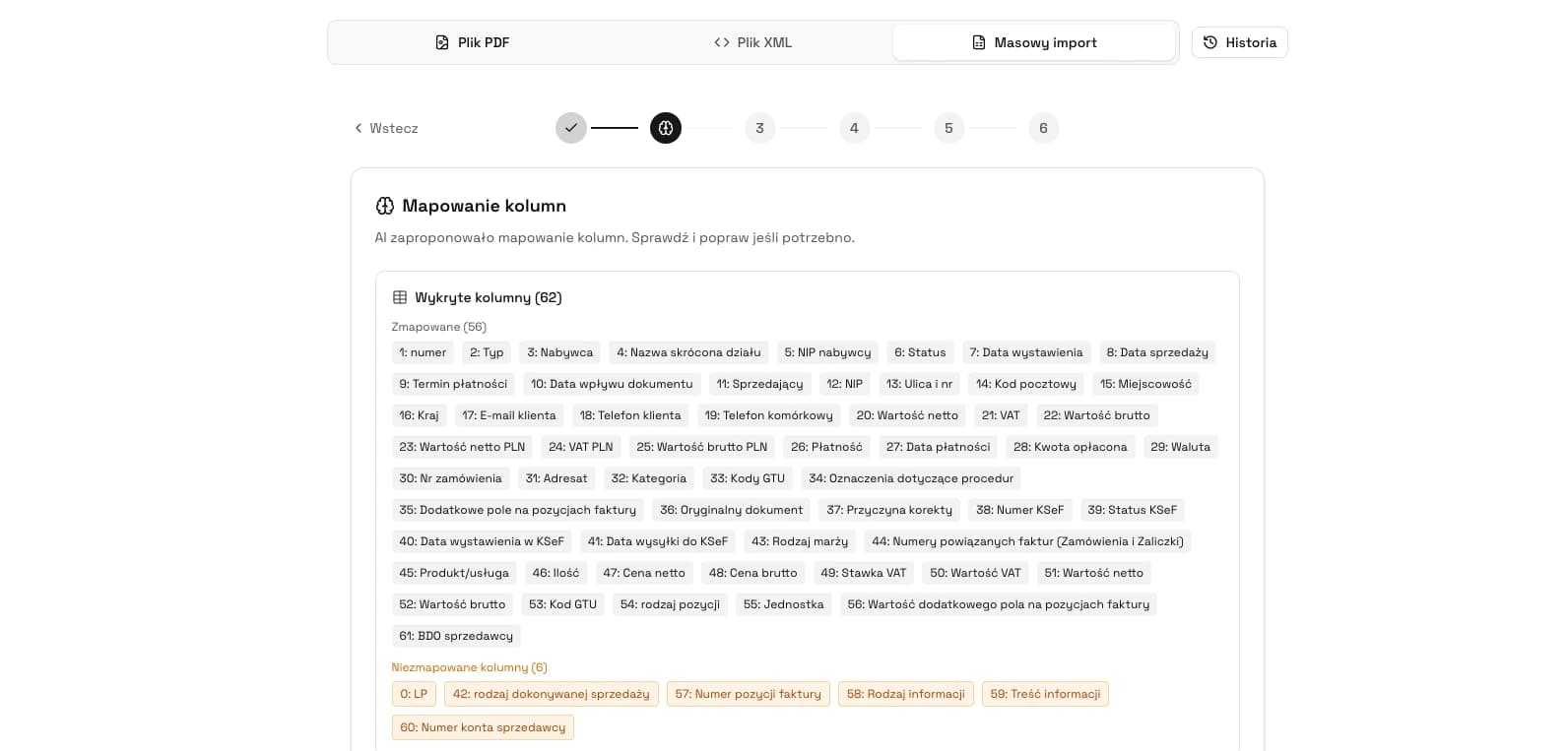
For recurring or larger volumes, CSV, XLS or XLSX may be a better source. KSeFGPT reads the columns, maps them to invoice fields, displays invoice drafts and separates rows that need correction. The guide to bulk invoice submission from Excel explains spreadsheet preparation in more detail.
Incoming invoices must not be sent to KSeF again through this process. The seller submits them, and the buyer retrieves them from KSeF after acceptance.
PDF works for individual sales invoices but requires careful review of the extracted data. CSV, XLS and XLSX suit repeatable data but require correct column mapping. FA(3) XML is the structured invoice sent to KSeF, not a substitute for reviewing source data.
| Source | How it is read | Best use | Most important check |
|---|---|---|---|
| OCR and AI | Individual sales invoices issued in SAP | Whether every field was read correctly from the document | |
| CSV | File parsing and column mapping | Repeatable data exports | Encoding, delimiter, dates, amounts and line-item grouping |
| XLS or XLSX | File parsing and column mapping | Larger invoice sets in a spreadsheet | Headers, cell types, duplicates and complete line items |
| FA(3) XML | Schema validation | A prepared structured invoice | Technical and substantive correctness before submission |
How does the current SAP to KSeF process work?
The current process includes a manual file handoff. A user first exports the sales document or data from SAP and then starts an import in KSeFGPT. The invoice can be submitted to KSeF only after the draft has been reviewed.
Step 1: export a PDF or CSV/XLS/XLSX data from the correct SAP document. Step 2: import the file into KSeFGPT. Step 3: review OCR extraction or column mapping. Step 4: correct invoice data and remove duplicates. Step 5: run validation. Step 6: approve submission to KSeF. Step 7: check the processing result, KSeF number and UPO.
SAP -> file export -> KSeFGPT -> review -> KSeF is the current process. It does not automatically write the KSeF number back to SAP. That requires the planned integration or a separate connection implemented for the customer.
| Stage | What happens now | Who controls it |
|---|---|---|
| SAP export | A PDF or tabular file is generated when the environment supports it | SAP user or process owner |
| KSeFGPT import | OCR reads the PDF or the import mechanism processes the spreadsheet | KSeFGPT user |
| Review | An invoice draft is created and can be corrected before submission | Accounting or sales |
| KSeF submission | KSeFGPT sends the prepared invoice to the system | Authorised user and KSeF configuration |
| Result | A status is available after processing and a successful invoice receives a KSeF number and UPO | Submission operations team |
| SAP | There is no automatic return write-back from KSeFGPT | The company defines its current recording method |
Do you have an invoice export from SAP?
Import a PDF or tabular file, review the data and prepare valid invoices for KSeF submission in KSeFGPT.
Open KSeFGPTWhat does invoice submission alone not confirm?
Submitting an invoice starts asynchronous processing. The technical response contains a reference number that can be used to track the operation, but it is not the KSeF number and does not yet confirm acceptance.
SAP document number: identifies the document in the source system. Reference number: identifies the technical submission operation. KSeF number: is assigned after acceptance. UPO: records the acceptance result and contains the KSeF number.
A correlation model should retain the SAP document ID, KSeFGPT import ID, submission reference number, KSeF number after success and the target reference in SAP. The first four items can be tracked in the current process, while automatic storage of the last item belongs to the planned integration.
Only a successful final processing result, KSeF number and available UPO close the path of an accepted invoice. If processing is still under way or has failed, an automatic retry without checking the current state can create a duplicate. Read more in KSeF number on an invoice and How to check invoice status in KSeF.
| Identifier | When it is created | What it confirms | Where it should be linked |
|---|---|---|---|
| SAP document number | When the source document is created | The document identity in SAP | The SAP invoice record |
| Reference number | After KSeF accepts the submission request | The ability to check the operation | The KSeFGPT submission history |
| KSeF number | After KSeF accepts the invoice | The invoice identity in KSeF | The source document and UPO |
| UPO | After successful processing | The official receipt result | The invoice and the company's durable archive |
How is the planned KSeFGPT and SAP integration intended to work?
The planned integration is intended to remove manual export and manual result entry. The assumed process starts by retrieving issued sales-invoice data from SAP, then continues through mapping, review and submission in KSeFGPT, and finishes when KSeF returns the processing result.
The confirmed product direction is to return the KSeF number to SAP after acceptance and associate it with the correct document. The supported SAP products and versions, connection method, target field, synchronisation of status, dates, UPO and errors, and retry rules still need to be defined.
Until the specification and release date are public, this integration should be treated as a development plan. Do not assume that SAP ECC, S/4HANA, Business One, cloud editions and on-premises installations will all have the same scope.
If you need SAP and KSeF integration, email contact@flippi.co. Include your SAP version, approximate monthly sales-invoice volume and the expected data-exchange scope.
| Stage | Current process | Planned integration |
|---|---|---|
| Source | Manual PDF or CSV/XLS/XLSX export | Data retrieval from a supported SAP environment |
| Reading | OCR or file mapping | Mapping SAP data to the invoice model |
| Control | Invoice-draft review and correction | Agreed validation and approval rules |
| Submission | Invoice submitted from KSeFGPT | Invoice submitted from KSeFGPT after completing the process |
| KSeF result | Status, KSeF number and UPO visible in KSeFGPT | KSeFGPT retrieves the processing result |
| SAP storage | No automatic write-back | KSeF number associated with the correct SAP document |
How should SAP be prepared for a future integration?
Before integration starts, the company can settle the most important design decisions. The connection itself is rarely the longest part of the project. Data ownership, responsibility, correlation and exception handling usually require more work.
Environment: record the SAP family, release, update level, deployment model and local extensions. Documents: list invoice types, entities, Polish tax IDs, currencies, corrections and volumes. Data: identify the owner of every field and a stable document ID. Result: decide where the KSeF number should be stored and who handles rejection.
Tests should cover successful acceptance, validation error, missing permission, duplicate, interrupted connection and retry. Before resubmission, the system must check the state of the previous operation so that the same document is not submitted twice.
| Area | Question before the project | Risk if unanswered |
|---|---|---|
| SAP version | Which product, release and update level does the company use? | Design based on functions unavailable in the environment |
| Source document | Which record owns the invoice number and sales data? | No reliable link to the KSeF result |
| Mapping | Where does each required invoice field come from? | Missing data or manual corrections after import |
| Return write-back | Where should the KSeF number be stored and who may update it? | The number remains outside SAP or is attached to the wrong document |
| Errors | Who analyses rejection and decides whether to retry? | Duplicates, ownerless queues and a missing audit trail |
How should the right operating model be chosen?
File import is a transition option when the volume is manageable and a reliable sales-invoice export is available from SAP. It also reveals data-quality and mapping problems before a larger integration project begins.
SAP's native solution makes sense when an organisation wants to keep the process inside its SAP landscape, has the required versions and skills, and plans to develop eDocument or DRC. The full process should be verified, not merely document creation and submission.
The planned KSeFGPT integration may suit a company that wants KSeFGPT to remain the validation, submission and monitoring layer while eliminating manual export and manual KSeF-number entry. A final decision still requires a published integration scope and tests in the company's SAP environment.
Compare implementation cost and time for the same scope: input data, invoice types, permissions, statuses, UPO, errors, retries, monitoring and support. See KSeF implementation cost in manufacturing for a broader model.
Implementation perspective
Do not begin the project by choosing the connection technology. First identify the source document, data owner and completion condition. If the company does not know which SAP record should receive the KSeF number or who handles rejection, connecting the systems will not solve the operational problem.
File import can be a useful observation stage before automation. It reveals missing export data, mapping differences and the decisions users make before submission. Those findings can become rules for the future integration instead of being designed only from technical documentation.
Accept the completed integration against business scenarios, not one correct document. Success, rejection, duplicate, interrupted connection and retry tests should produce an unambiguous state in both KSeFGPT and SAP. Only then does automatic KSeF-number storage genuinely close the invoice process.
Frequently asked questions
Does KSeFGPT already integrate directly with SAP?
No. As of July 21, 2026, KSeFGPT does not offer a direct SAP integration. If a report or SAP configuration can export issued sales invoices to PDF, CSV, XLS or XLSX, those files can be imported into KSeFGPT. Automatic retrieval from SAP and writing the KSeF number back to SAP are part of a planned integration with no announced release date.
How can an issued sales invoice be sent from SAP to KSeF through KSeFGPT?
Export the issued sales invoice from SAP as a PDF or tabular data if your configuration supports that export. KSeFGPT reads a PDF with OCR and AI, while CSV, XLS and XLSX files use column mapping. Review the invoice draft, correct the data, run validation and submit the document to KSeF. After processing, check the status, KSeF number and UPO official receipt.
Does SAP provide its own KSeF support?
Yes. SAP documents KSeF scenarios for its products through solutions such as eDocument, eDocument Cockpit, Manage Electronic Documents and SAP Document and Reporting Compliance. Availability depends on the product family, version, update level and configuration. Check the documentation for your exact SAP environment before choosing an approach.
When can the KSeF number be stored in SAP?
The KSeF number can be stored only after KSeF accepts the invoice. Submission first returns a technical reference number and starts processing, but it does not yet confirm acceptance. The planned KSeFGPT integration is intended to associate the KSeF number with the correct SAP document after processing, but the exact target field and return-data scope have not been announced.
Recommended reading
These four articles help organise the next decisions in an SAP and KSeF process:
How to submit many invoices to KSeF from Excel - preparing and reviewing tabular data before submission.
Can a PDF be sent to KSeF? - the difference between a source document and a structured invoice.
KSeF number on an invoice - when the number is assigned and what it means in the process.
KSeF implementation cost in manufacturing - analysis, integration, testing and maintenance considerations.
Submit invoices exported from SAP
Import PDF, CSV, XLS or XLSX into KSeFGPT, review the data and follow a controlled KSeF submission process.
Open KSeFGPTSources
The SAP and KSeF descriptions use official vendor and Polish Ministry of Finance documentation. KSeFGPT capability statements reflect the product status as of July 21, 2026.
- Creating and Submitting Electronic Customer Invoices
SAP Help Portal · accessed: July 21, 2026
SAP ERP documentation for eDocument creation, invoice submission and KSeF response processing.
- KSeF number and collective identifier
Polish Ministry of Finance · accessed: July 21, 2026
Official explanation of when a KSeF number is assigned, its presence in UPO and how it differs from the seller's invoice number.
- KSeF API 2.0 interactive session
Polish Ministry of Finance IT Centre · accessed: July 21, 2026
Official documentation for invoice submission, the reference number and asynchronous processing-result checks.
- Checking invoice status and downloading UPO
Polish Ministry of Finance IT Centre · accessed: July 21, 2026
Official documentation for retrieving status, the KSeF number and UPO after invoice processing.
- KSeFGPT invoice import
KSeFGPT · accessed: July 21, 2026
Public description of PDF and spreadsheet import, field mapping, validation and document review before submission.